
Sponsored
Loading
Ducatti20
Well-Known Member
- Joined
- Sep 24, 2024
- Threads
- 0
- Messages
- 130
- Reaction score
- 194
- Location
- Phoenix, AZ
- Vehicle(s)
- 2024 Mustang GT, 1967 Mustang Coupe 289
Unfortunately no. All versions of the car will always default to the "Normal" drive mode and settings every restart.
Starship Enterprise
Well-Known Member
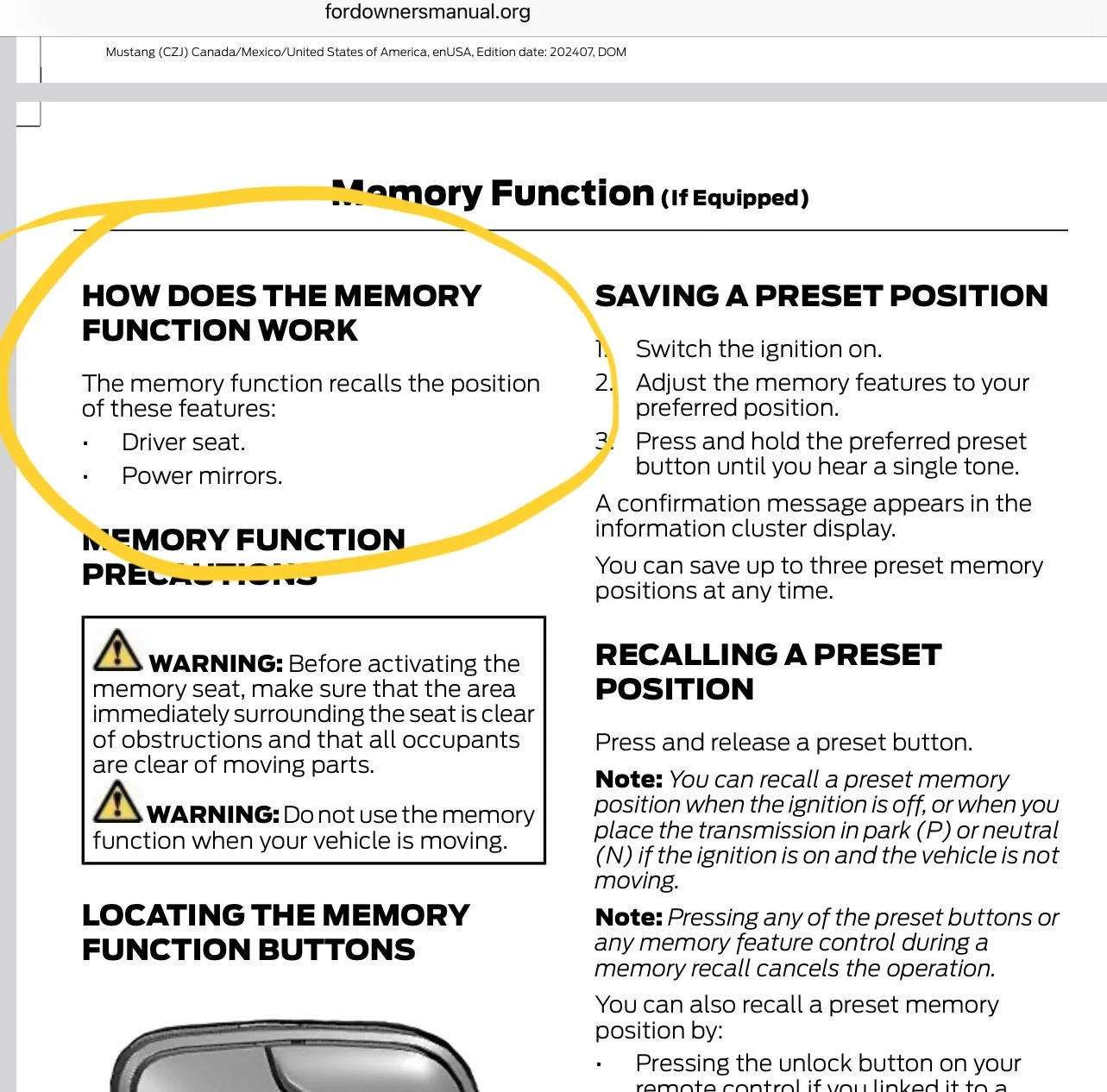
The driver memory only saves seat and side view mirror position.
To save your drive settings, you create a drive profile and save it and it will appear as Custom 1-6 on your steering wheel above Normal. You can save up to 6 different drive preference settings, but only assign one preferred custom profile to your steering wheel.
To save your drive settings, you create a drive profile and save it and it will appear as Custom 1-6 on your steering wheel above Normal. You can save up to 6 different drive preference settings, but only assign one preferred custom profile to your steering wheel.

LouG
Well-Known Member
- Joined
- Mar 11, 2025
- Threads
- 38
- Messages
- 2,895
- Reaction score
- 3,435
- Location
- New Zealand
- Vehicle(s)
- 2025 Mustang GT
There is no way to change a profile without going into custom menu etc?The driver memory only saves seat and side view mirror position.
To save your drive settings, you create a drive profile and save it and it will appear as Custom 1-6 on your steering wheel above Normal. You can save up to 6 different drive preference settings, but only assign one preferred custom profile to your steering wheel.
AZ_Ryan
Well-Known Member
That's not true. It's supposed to save your gauge cluster as well.The driver memory only saves seat and side view mirror position.
To save your drive settings, you create a drive profile and save it and it will appear as Custom 1-6 on your steering wheel above Normal. You can save up to 6 different drive preference settings, but only assign one preferred custom profile to your steering wheel.
Starship Enterprise
Well-Known Member
not as far as I know. It would be nice if the steering wheel let you select more than one custom profile.There is no way to change a profile without going into custom menu etc?
Hmmmmm……I will try that and verify, but I don’t think so. But you never know, you might be right and I never noticed. I need to try it.That's not true. It's supposed to save your gauge cluster as well.
According to the manual, it only saves seat and mirror position.

Katzenjammer
Well-Known Member
It saves lighting color preferences also. Just had my colors reset due to an update, pressed 1 and my preferred color scheme was restored (2024 GT deluxe built in Feb 24).
Sofa King
Well-Known Member
- Joined
- Jul 14, 2023
- Threads
- 15
- Messages
- 1,879
- Reaction score
- 2,054
- Location
- In a VAN down by the river
- Website
- youtu.be
- Vehicle(s)
- 2024 Ecoboost Premium, Vapor Blue, HPP | 2025 Ecoboost Premium, Molten Magenta
That's why the mode selector is on the wheel... easy to change it to what you want quickly!
Starship Enterprise
Well-Known Member
Wow…I’m going to change my colors and gage cluster and then press 1 and see what happens.
Starship Enterprise
Well-Known Member
Just to be clear, we are talking about the button on the door Not the steering wheel….right?That's why the mode selector is on the wheel... easy to change it to what you want quickly!
AZ_Ryan
Well-Known Member
There is no way to change a profile without going into custom menu etc?
There was a whole thread about this. That is yet another example of the manual being woefully inadequate.not as far as I know. It would be nice if the steering wheel let you select more than one custom profile.
Hmmmmm……I will try that and verify, but I don’t think so. But you never know, you might be right and I never noticed. I need to try it.
According to the manual, it only saves seat and mirror position.

AZ_Ryan
Well-Known Member
He's talking about the drive mode on the wheel. We're talking about the seat button on the door. You can absolutely program colors and save them to the door profiles. It is supposed to save the cluster too, but there is a glitch that sometimes doesn't allow it to save. It's worked intermittently for me.Just to be clear, we are talking about the button on the door Not the steering wheel….right?
Starship Enterprise
Well-Known Member
OK…interesting! I’ll take real driver experiences over the manual sometimes. The manual also cut and pastes from previous models, or posts features that either no longer exist or features that have been expanded on.He's talking about the drive mode on the wheel. We're talking about the seat button on the door. You can absolutely program colors and save them to the door profiles. It is supposed to save the cluster too, but there is a glitch that sometimes doesn't allow it to save. It's worked intermittently for me.
Starship Enterprise
Well-Known Member
Today I reset my ambient lighting and gage colors, then hit Driver Setting 1 on the door. Other than seat and side mirror, I can confirm it DID reset the My Color Lighting, but did not change the gage cluster look.
My guess is that since gage cluster looks change with Custom Drive profile setting on the steering wheel, it would have been a conflict.
My guess is that since gage cluster looks change with Custom Drive profile setting on the steering wheel, it would have been a conflict.
Sponsored


