Sponsored

Forscan

roadpilot

Well-Known Member
Joined
Feb 12, 2024
Threads
9
Messages
3,260
Reaction score
3,697
Location
Michigan
Vehicle(s)
21 F150 Platinum, 16 ATS4, 14 LTZ
Yes I enabled that (point 3) I think I used the values in the sheet under auto-lock, haven’t tested that though.
Thanks!
I can confirm that, if the changes were applied correctly, it will work. :)
Sponsored


pecco1988

Well-Known Member
Joined
Dec 24, 2024
Threads
3
Messages
72
Reaction score
38
Location
Northern New Jersey
Vehicle(s)
2024 Dark Horse
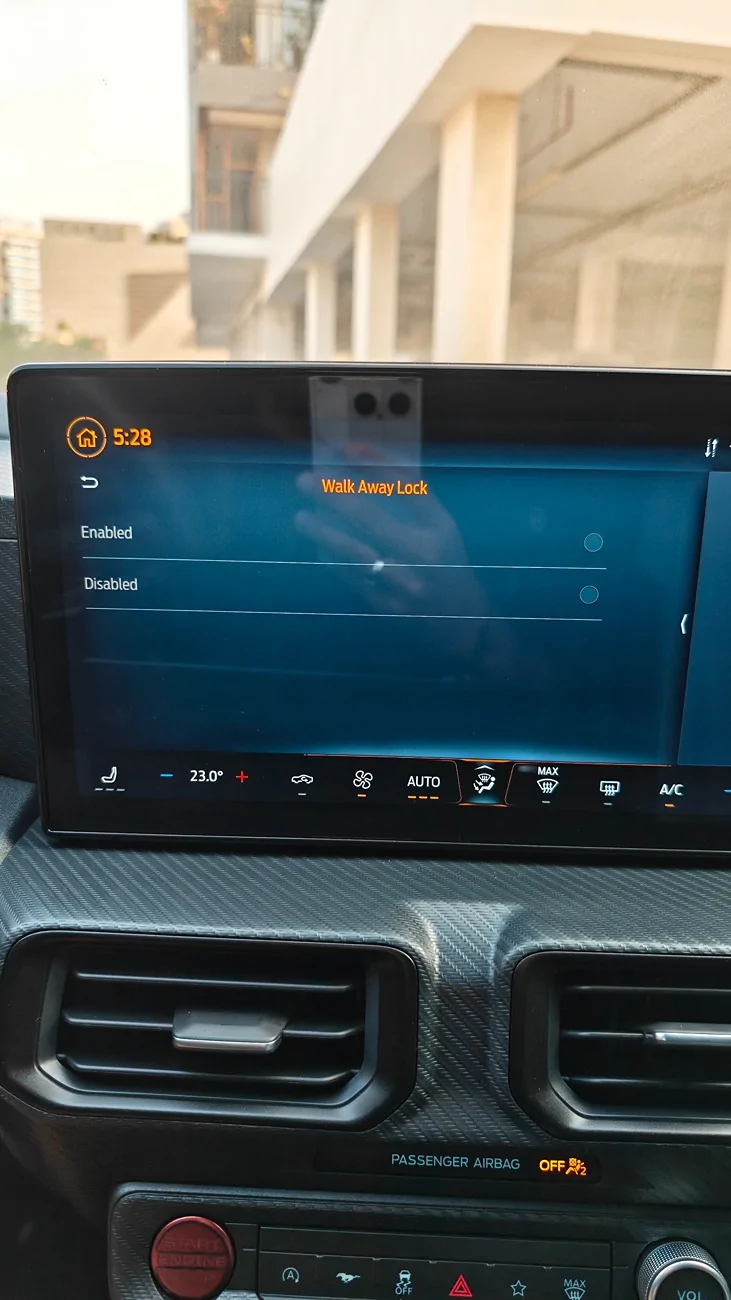
Here is what I have done till now:
- continuous gear display
- walkaway lock with feedback
- auto lock after 45s
if you dont mind me asking. what did u exactly change for those?
 

bfets

Well-Known Member
Joined
Sep 16, 2022
Threads
14
Messages
704
Reaction score
1,044
Location
Western Australia
Vehicle(s)
MY24.5 Dark Horse, manual, Blue Ember, Recaros. XPEL UltimateFusion Fullbody PPF
Just wondering. I'm seeing lots of people complaining about the "keep your hands on the steering wheel" warning which goes away if you disable lane keep assist. Problem is the car defaults to this being on so you need to turn it off every time. Can this be defaulted to off with Forscan?
 

Zeeku22

Member
Joined
Jan 16, 2025
Threads
0
Messages
5
Reaction score
2
Location
Utan
Vehicle(s)
S650 gt premium 10 speed
* removed emergency-brake nag

* got rid of seat belt chimes, displays, nagging

* got rid of door open chime, start car chime, startup chime, and other senseless sounds

* forced warning/notice alert sounds to come through 'instrument cluster' instead of sound system (much quieter, less annoying sound, and sound is shorter)

* force clock to 24hrs (didn't "stick" when done through the dash)

* removed front radar, and therefore disabled

** adaptive cruise control
** low speed collision mitigation
** lane assist
(above allows standard cruise control to work)

* changed keyfob panic alarm from one press to two presses, to prevent accidental triggering in pocket


For the forward collision assist you can actually disable it through the abs module, it'll disable collision assistance while still allowing adaptive cruise and normal cruise control to be toggled, although you will have a "collision assist unavailable" warning on the dash. I like it being there as it confirms that The collision assist is off. You can remove the warning All together through the BCM.


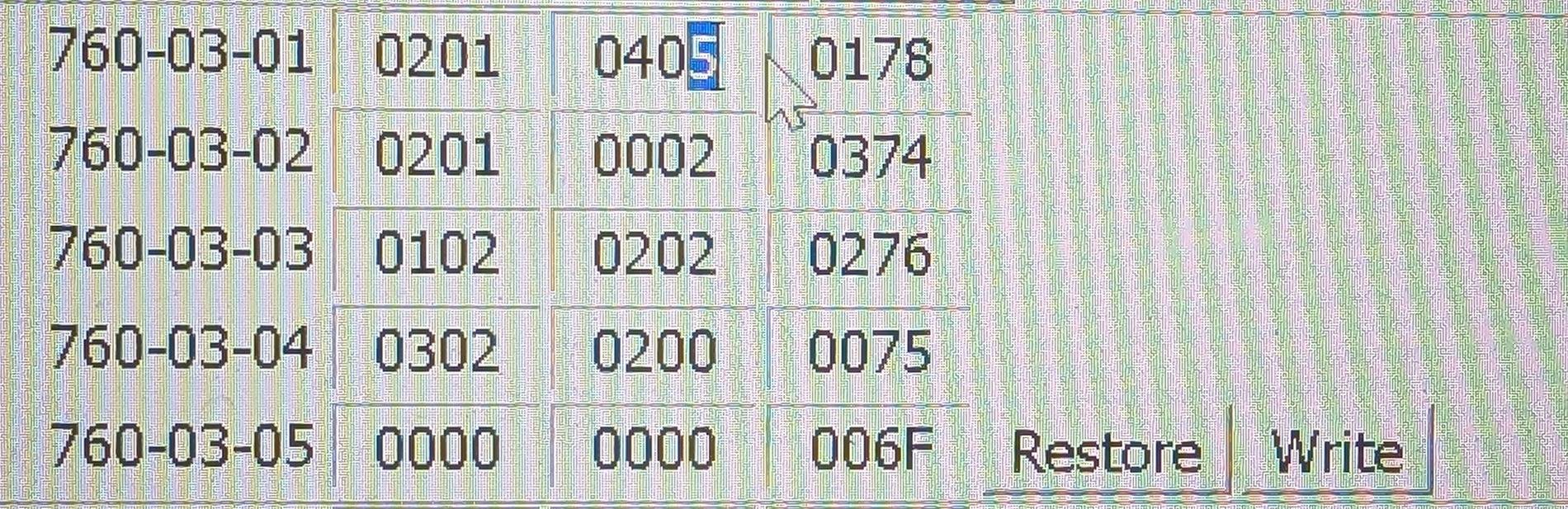
Highlighted in blue is the address that should be changed to 1

If there is an issue change that same number back to 5

PXL_20250428_001050248.MP~2.jpg
 

ydoucare

Active Member
Joined
Feb 15, 2017
Threads
1
Messages
25
Reaction score
3
Location
US
Vehicle(s)
2024 EB Premium
This is probably a shot in the dark, but does anyone know if it's possible to allow custom steering feel setting in the non-Normal drive modes? Sport/Track/Drag/etc have it locked to the drive mode. On the S550 we didn't have this limitation. Nothing in FORscan stood out for this, so probably just wishful thinking, but figured i'd ask.


ydoucare

Active Member
Joined
Feb 15, 2017
Threads
1
Messages
25
Reaction score
3
Location
US
Vehicle(s)
2024 EB Premium
I think a custom profile can do that.
Sadly no, you can only change the steering feel in the custom mode if the base mode is Normal. If you choose any other drive mode as the base then you can't change the steering, it'll be locked to whatever the base mode is.
 

Sofa King

Well-Known Member
Joined
Jul 14, 2023
Threads
12
Messages
1,622
Reaction score
1,703
Location
In a VAN down by the river
Vehicle(s)
2024 Ecoboost, Vapor Blue, HPP
Sadly no, you can only change the steering feel in the custom mode if the base mode is Normal. If you choose any other drive mode as the base then you can't change the steering, it'll be locked to whatever the base mode is.
That's too bad... I saw the setting in there, but I am not using custom modes, so not too familiar with how they are setup.
 

ydoucare

Active Member
Joined
Feb 15, 2017
Threads
1
Messages
25
Reaction score
3
Location
US
Vehicle(s)
2024 EB Premium
That's too bad... I saw the setting in there, but I am not using custom modes, so not too familiar with how they are setup.
Yeah, i'm not sure why they would impose that limitation. It's a head scratcher.
 

Linwei

Well-Known Member
Joined
Aug 3, 2025
Threads
1
Messages
54
Reaction score
10
Location
Germany, UK and UAE
Vehicle(s)
S650
Here is what I have done till now:
- continuous gear display
- walkaway lock with feedback
- auto lock after 45s

Can I ask please what you had to change to enable walkway locking?

I posted in another thread here, but could not get it to work.

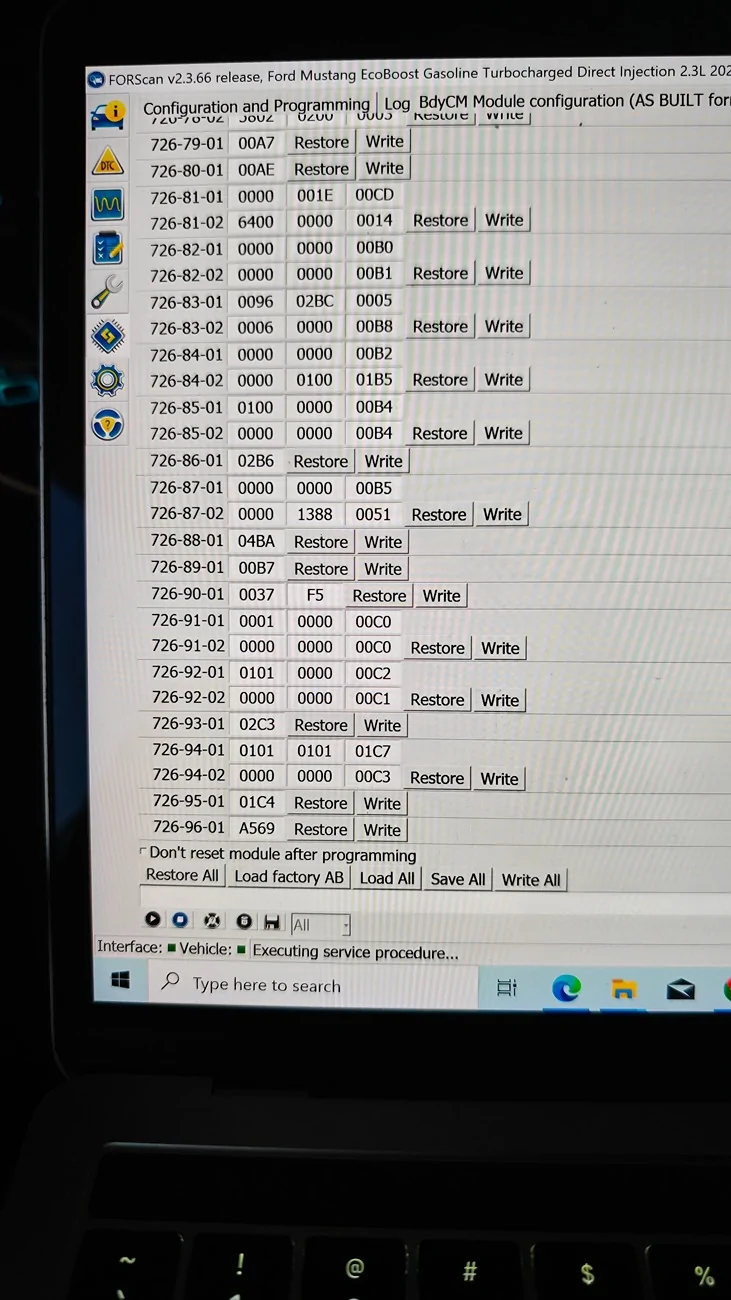
I changed the APIM

7D0-09-05

BCM

726-91-01


In the first tab of the excel sheet it also mentions to change BCM 726-97-02, but these lines don't even show up for me. The entries stop at 96.

IMG_20250906_183723803.webp


IMG_20250824_172824528.webp
 

D/\rK•650

Well-Known Member
Joined
Aug 8, 2025
Threads
19
Messages
753
Reaction score
518
Location
California
Vehicle(s)
2025 Mustang DarkHorse
Here is what I have done till now:
- continuous gear display
- walkaway lock with feedback
- auto lock after 45s
Hello would you mind posting the values you changed to get these to work? Maybe a screenshot with the highlighted characters to change? Im new to Forscan and I am wanting to take a crack at it after I learn Forscan a bit. Maybe it would be different i have a darkhoe?
 

BimmerDriver

Well-Known Member
Joined
Aug 24, 2018
Threads
20
Messages
577
Reaction score
472
Location
RDU, NC
Vehicle(s)
BMW, S650 DH Carbonized Gray w/3 pedals
For the forward collision assist you can actually disable it... although you will have a "collision assist unavailable" warning... You can remove the warning All together through the BCM.
That worked great, thanks!
 
Last edited:

Dark Sprite

Well-Known Member
Joined
Jan 13, 2026
Threads
7
Messages
193
Reaction score
182
Location
UAE
Vehicle(s)
Vapour Blue MCP7125 700A DH (non-HP)
Can one of you who has Forscan please confirm whether it’s possible to disable/enable remote rev function and what setting needs to be changed to allow it?

 

rugedraw

Well-Known Member
Joined
Apr 17, 2024
Threads
1
Messages
460
Reaction score
569
Location
Miami, FL
Vehicle(s)
2021 F150 701a 3.5tt 4x4; 2023 Bronco Sport Badlands; 1991 Mustang 5.0 coupe
Can one of you who has Forscan please confirm whether it’s possible to disable/enable remote rev function and what setting needs to be changed to allow it?
This is enabled here in the PCM:

1768664271580-o7.webp


There may be other things that need to be changed in other modules......not sure, but this for sure needs to be enabled.
Sponsored


Top