Sponsored

slickthewhale

Member
Joined
Sep 6, 2025
Threads
1
Messages
23
Reaction score
12
Location
coppel,TX
Vehicle(s)
2025 Mustang GT
Yo has anyone found out how to enable the dark horse tail light animation? I have a 2025 301a GT. The tail lights just flash when unlocking, and don't have the animation. I was able to do the headlights but can’t figure out the tail lights. Help please!!!
Sponsored
 

ChrisMattice

Well-Known Member
Joined
Jun 5, 2023
Threads
1
Messages
45
Reaction score
42
Location
Albany NY
Vehicle(s)
2017 Ford F150 XLT
I saw the RTR startup animations for both screens on the press release and they are pretty nice! I wonder if Ford already snuck these in on a recent update. Might have to do some testing on some of the values that weren’t used previously. It would be a nice add seeing I have a few RTR parts on mine.
 

slickthewhale

Member
Joined
Sep 6, 2025
Threads
1
Messages
23
Reaction score
12
Location
coppel,TX
Vehicle(s)
2025 Mustang GT
I saw the RTR startup animations for both screens on the press release and they are pretty nice! I wonder if Ford already snuck these in on a recent update. Might have to do some testing on some of the values that weren’t used previously. It would be a nice add seeing I have a few RTR parts on mine.
Do you have any idea on which module to change to get 301a GT tail lights to have the same sequence as a premium or dark horse?
 

ChrisMattice

Well-Known Member
Joined
Jun 5, 2023
Threads
1
Messages
45
Reaction score
42
Location
Albany NY
Vehicle(s)
2017 Ford F150 XLT
I was talking about the internal screens BUT I looked in to this a while ago.

I didn’t find a ForScan code for this. The only thing I can think of is using FDRS and reflashing the module responsible for tail light controls from a premium or dark horse VIN similar to how we have to do the GTD DRL’s with the headlight modules.


slickthewhale

Member
Joined
Sep 6, 2025
Threads
1
Messages
23
Reaction score
12
Location
coppel,TX
Vehicle(s)
2025 Mustang GT
I was talking about the internal screens BUT I looked in to this a while ago.

I didn’t find a ForScan code for this. The only thing I can think of is using FDRS and reflashing the module responsible for tail light controls from a premium or dark horse VIN similar to how we have to do the GTD DRL’s with the headlight modules.
I’ve been able to get the dark horse splash screen and IPC screen, I’ve been trying to find the code to enable the GTD IPC screen as well. No luck. If you figure out the RTR boot animations lmk! I’m gonna play with it later today.
 

slickthewhale

Member
Joined
Sep 6, 2025
Threads
1
Messages
23
Reaction score
12
Location
coppel,TX
Vehicle(s)
2025 Mustang GT
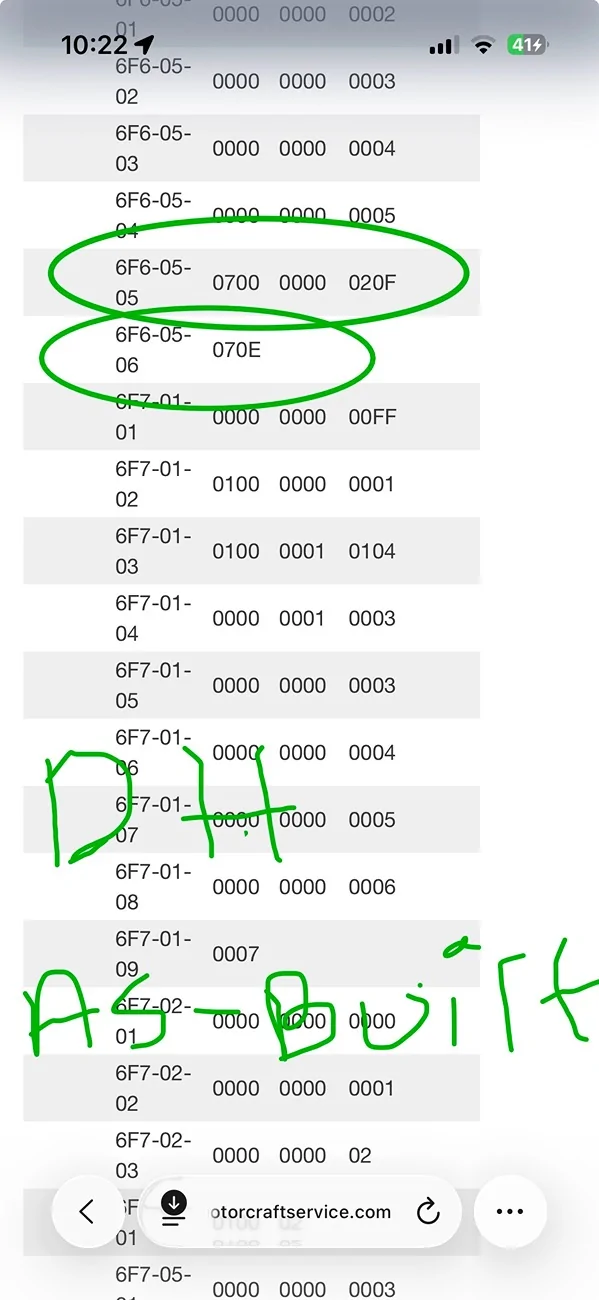
I’ve figured out how to get rid of the pinkish-orangish tint on the drl’s after switching to the dark horse welcome light show. For both 6F7-05-06 and 6F6-05-06 you’ll want to change X*XX to the number 7. Once you do that you’ll notice XXX* will change to a letter, for 6F7 mine changed to an F, for 6F6 it changed to an E, which is correct for the dark horse as-built that I pulled.
 

GrabThatBlue

Well-Known Member
Joined
Jan 13, 2025
Threads
36
Messages
2,326
Reaction score
2,498
Location
Between Canada and Europe
Vehicle(s)
Mustang GT Premium, 401A, 10R80, PP, AE, NPP, MR, Recaro
I’ve figured out how to get rid of the pinkish-orangish tint on the drl’s after switching to the dark horse welcome light show. For both 6F7-05-06 and 6F6-05-06 you’ll want to change X*XX to the number 7. Once you do that you’ll notice XXX* will change to a letter, for 6F7 mine changed to an F, for 6F6 it changed to an E, which is correct for the dark horse as-built that I pulled.
The last two digits are check digits. They change automatically if you change something in the adress and we don't need to look at them or do anything with them.
 

slickthewhale

Member
Joined
Sep 6, 2025
Threads
1
Messages
23
Reaction score
12
Location
coppel,TX
Vehicle(s)
2025 Mustang GT
The last two digits are check digits. They change automatically if you change something in the adress and we don't need to look at them or do anything with them.
I never said to change the checksum or do anything with it. It was simply an observation. I said once you change the appropriate character in the address, the checksum character will change to E and F depending on if you were on LDCMA or LDCMB, which matches exactly to the dark horse as-built that I have. Before when there was a 9 in X*XX for both 6F7-05-06 and 6F6-05-06, the checksums were actual numbers, not letters, and I had the weird pink-orange tint. Long story short, change the 9 to a 7 and the pinkish orange tint will go away.

IMG_2988.webp
 

Ale_star

Active Member
Joined
Apr 12, 2025
Threads
3
Messages
32
Reaction score
1
Location
Tampa florida
Vehicle(s)
Mustang ecoboost 2024
[CITA="slickthewhale, mensaje: 3440601, miembro: 65094"]
He descubierto cómo eliminar el tono rosado-anaranjado de las luces diurnas después de cambiar al sistema de luces de bienvenida Dark Horse. Tanto para 6F7-05-06 como para 6F6-05-06, debes cambiar X*XX por el número 7. Una vez hecho esto, verás que XXX* se convierte en una letra; en el caso de 6F7, se convirtió en una F, y en el de 6F6, en una E, lo cual coincide con el código de fábrica de Dark Horse que utilicé.
[/CITA]Thanks for the information. I tried it on my 2024 Mustang Ecoboost 301A and it worked perfectly. Goodbye to the pink lights!
 

slickthewhale

Member
Joined
Sep 6, 2025
Threads
1
Messages
23
Reaction score
12
Location
coppel,TX
Vehicle(s)
2025 Mustang GT
He descubierto cómo eliminar el tono rosado-anaranjado de las luces diurnas después de cambiar al sistema de luces de bienvenida Dark Horse. Tanto para 6F7-05-06 como para 6F6-05-06, debes cambiar X*XX por el número 7. Una vez hecho esto, verás que XXX* se convierte en una letra; en el caso de 6F7, se convirtió en una F, y en el de 6F6, en una E, lo cual coincide con el código de fábrica de Dark Horse que utilicé.
[/CITA]Thanks for the information. I tried it on my 2024 Mustang Ecoboost 301A and it worked perfectly. Goodbye to the pink lights!
Awesome man. I’m glad it worked!
 

Cool66

Well-Known Member
Joined
Jan 12, 2025
Threads
4
Messages
78
Reaction score
69
Location
Fernandina Beach, Florida
Vehicle(s)
2024 Mustang GT
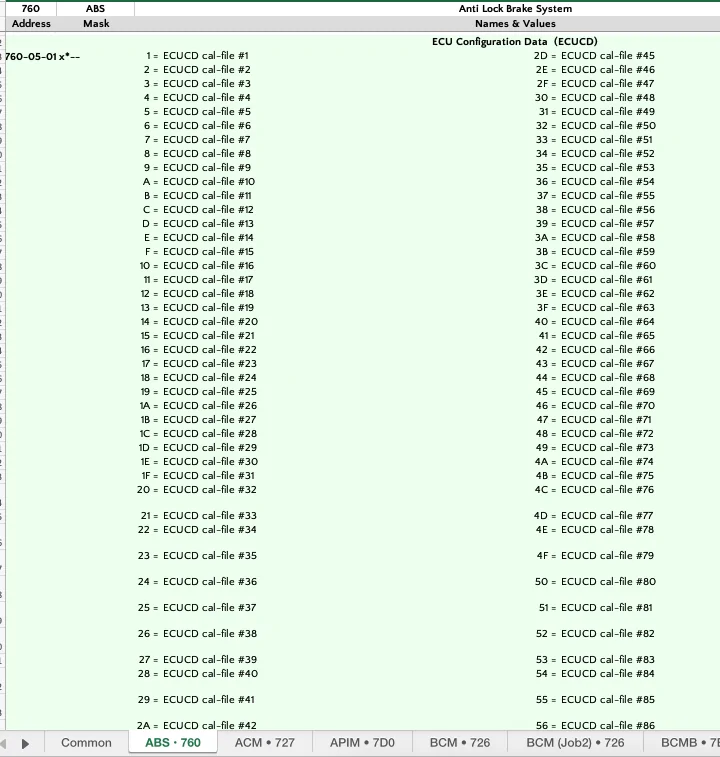
Looking for setting confirmation from either DH or GT PP for the attached two files. I have a Non PP GT and need to compare the files with that of a DH or GT PP. This is in relation to the inferred oil temp algorithm and the addition of the oil cooler to Non PP Mustangs. For additional clarity, FP and HPTuners have confirmed the alogorithm is generated in the BCM and not the PCM. The current belief is this could be addressed through settings within the BCM.

Screenshot 2025-11-20 at 3.44.59 PM.webp


Screenshot 2025-11-20 at 4.04.35 PM.webp
 

Darren C

New Member
Joined
Jul 25, 2025
Threads
0
Messages
3
Reaction score
0
Location
Spain
Vehicle(s)
Mustang GT ordered , seat ibiza fr
I tried with version .64 still got the same address 162 and i changed it to enable the remote rev and it worked

maybe we need to update the address on the excelsheet or maybe add the 162 address beside the 02 so people don't get confused
this is what i have been looking for , i have been trying for the last few weeks how to enable remote rev, as there is no option in the *easy* mode forscan, could you please tell me what code it is under , thank you in advance or better still a screenshot
 

Darren C

New Member
Joined
Jul 25, 2025
Threads
0
Messages
3
Reaction score
0
Location
Spain
Vehicle(s)
Mustang GT ordered , seat ibiza fr
OK i figured it out, i did as above and remote rev works (this is with a 3 button Key Fob) i use the Ford app to remote start
, Auto DH , Spain ...im just trying to find spreadsheet now for reverse tilt mirros and global windows opening shut
Sponsored


Top