Sponsored

Software updates, automatic

martin

Well-Known Member
Joined
Jul 24, 2014
Threads
34
Messages
623
Reaction score
65
Location
New England
Vehicle(s)
2024 GT convertible; manual: vapour blue; red leather : variable exhaust
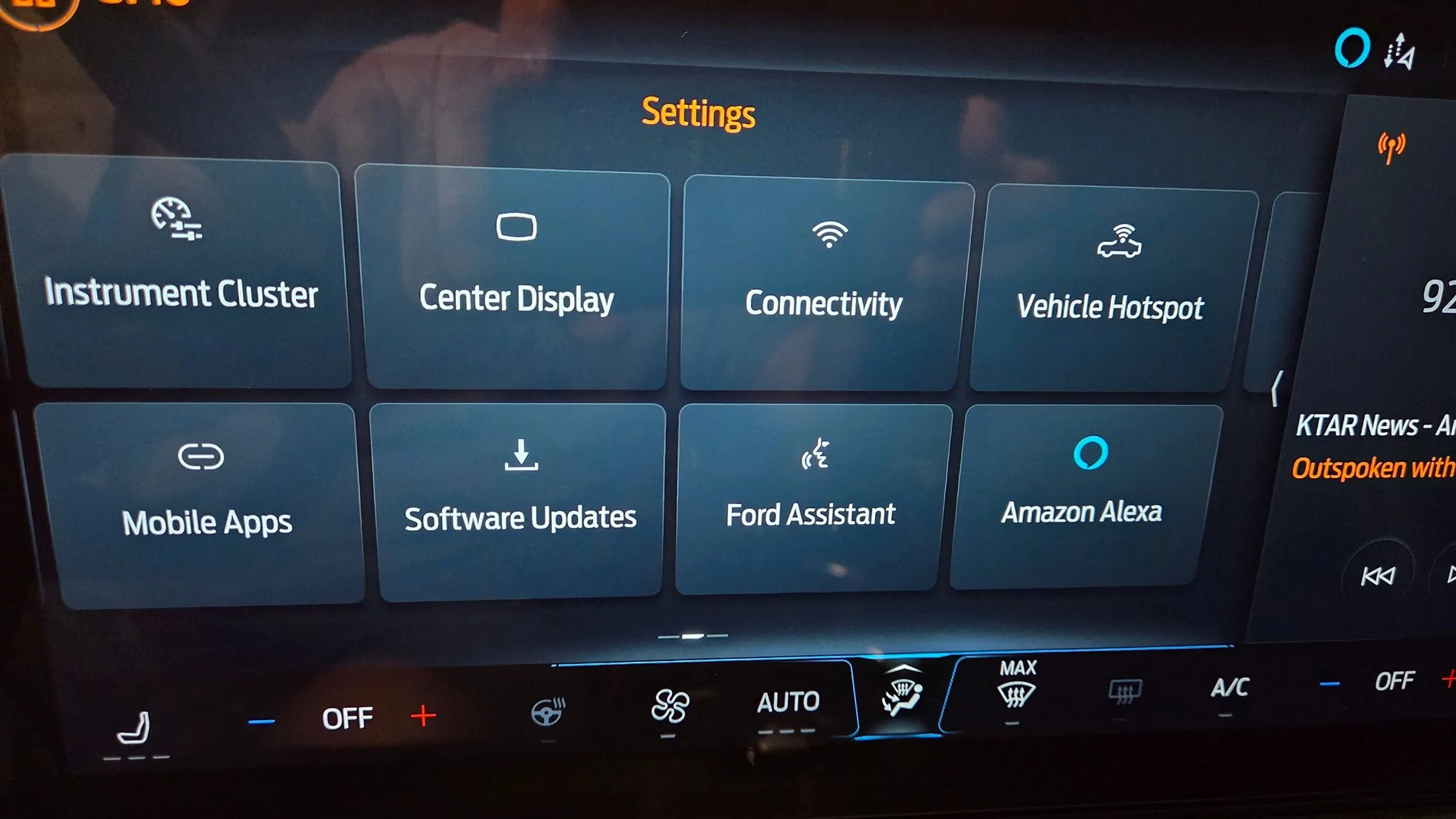
The screen text says go to settings and then software update. My settings does not show that. Where do I find that?
Sponsored

 

rugedraw

Well-Known Member
Joined
Apr 17, 2024
Threads
1
Messages
460
Reaction score
569
Location
Miami, FL
Vehicle(s)
2021 F150 701a 3.5tt 4x4; 2023 Bronco Sport Badlands; 1991 Mustang 5.0 coupe
Do you scroll to the side to see more options?
 
OP
OP

martin

Well-Known Member
Joined
Jul 24, 2014
Threads
34
Messages
623
Reaction score
65
Location
New England
Vehicle(s)
2024 GT convertible; manual: vapour blue; red leather : variable exhaust
Does it need a WiFi connection?
 

tktrain

Well-Known Member
Joined
Nov 20, 2025
Threads
2
Messages
118
Reaction score
122
Location
Evansville, IN
Vehicle(s)
1967 BB GTA, 1972 351 CJ Mach 1, 1972 351 CJ Convertible, 2025 Dark Horse Prm
I just had an update come in. I noticed it right after I started up. It offered a tour of the updates.


ducky124

Member
Joined
Feb 8, 2026
Threads
0
Messages
10
Reaction score
25
Location
New York
Vehicle(s)
2025 Ecoboost convertible premium
No, 99% of OTA's download via the built in modem and not wifi.
No, that’s not how it works. Vehicles equipped with built-in Wi-Fi and over-the-air (OTA) update capability are designed to prioritize a known, trusted Wi-Fi network when one is available.

If your car has Wi-Fi enabled and you’ve already connected it to your home network, it will automatically reconnect when it’s in range. When an update is available, the system will typically attempt to download it over that Wi-Fi connection first. This is intentional—Wi-Fi is faster, more stable, and doesn’t rely on cellular bandwidth limitations.

The cellular connection is essentially a fallback. It’s used when Wi-Fi isn’t available, but depending on the manufacturer, large updates may be restricted or significantly slower over cellular to avoid excessive data usage or incomplete downloads.

So in practice, if your vehicle is parked at home within range of your network, it will default to Wi-Fi for updates without you needing to do anything manually. The system is built to handle that prioritization automatically.
 

Alan Applegate

Well-Known Member
Joined
Sep 25, 2024
Threads
37
Messages
1,014
Reaction score
967
Location
Roswell, NM
Vehicle(s)
2024 Mustang Eco-Boost Premium
Ducky is correct. And, it is something you need to program or it will not work. As noted, even if you sign up for using the vehicle's modem via cellphone channels, updates are only WiFi.
 

rugedraw

Well-Known Member
Joined
Apr 17, 2024
Threads
1
Messages
460
Reaction score
569
Location
Miami, FL
Vehicle(s)
2021 F150 701a 3.5tt 4x4; 2023 Bronco Sport Badlands; 1991 Mustang 5.0 coupe
No, that’s not how it works. Vehicles equipped with built-in Wi-Fi and over-the-air (OTA) update capability are designed to prioritize a known, trusted Wi-Fi network when one is available.

If your car has Wi-Fi enabled and you’ve already connected it to your home network, it will automatically reconnect when it’s in range. When an update is available, the system will typically attempt to download it over that Wi-Fi connection first. This is intentional—Wi-Fi is faster, more stable, and doesn’t rely on cellular bandwidth limitations.

The cellular connection is essentially a fallback. It’s used when Wi-Fi isn’t available, but depending on the manufacturer, large updates may be restricted or significantly slower over cellular to avoid excessive data usage or incomplete downloads.

So in practice, if your vehicle is parked at home within range of your network, it will default to Wi-Fi for updates without you needing to do anything manually. The system is built to handle that prioritization automatically.
Ducky is correct. And, it is something you need to program or it will not work. As noted, even if you sign up for using the vehicle's modem via cellphone channels, updates are only WiFi.
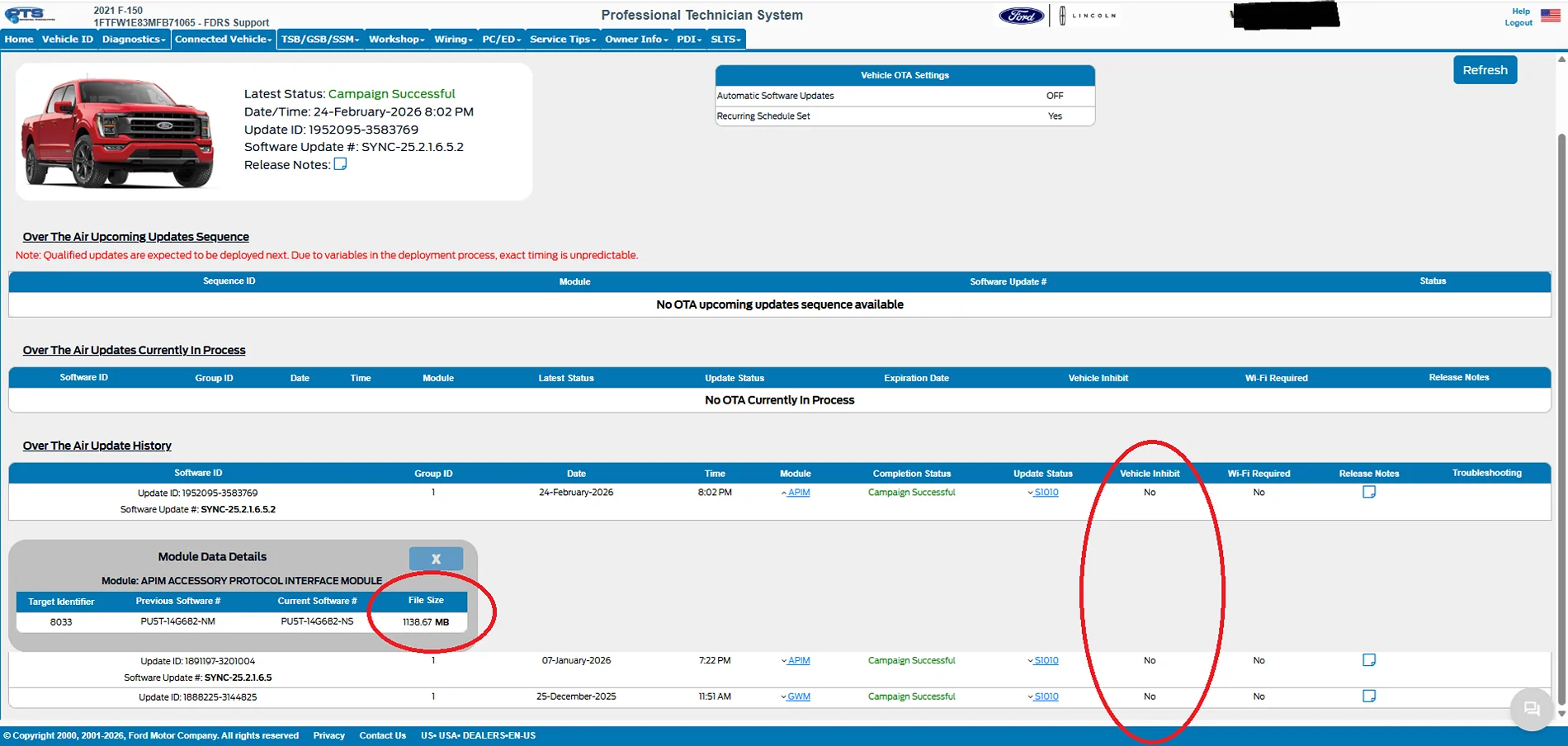
Incorrect. Even on wifi, the vehicle will use the modem for 99% of updates. Only a handful of updates come through wifi and these updates are to make specific changes in configurations and not updates the change the firmware itself.

I know this because there is not a single OTA for any Ford vehicle since they started doing this 5-6 years ago that I have not seen in PTS. The only OTA's that say "wifi required" are the DC ones (direct configuration) and the 7th gen Mustang has never gotten one of those.

The modem is used as part of the handshake to authorize the download of the files. It will not download via wifi. We have studied this in the F150 forum extensively. People have monitored their wifi traffic during an OTA download and it shows nothing that coincides with the size of the files downloaded.

S650 Mustang Software updates, automatic Untitled
 
Last edited:

Gregs24

Well-Known Member
Joined
Aug 31, 2018
Threads
10
Messages
2,713
Reaction score
1,498
Location
Wiltshire UK & Charente FR
Vehicle(s)
Mustang V8 GT, Ford Kuga PHEV
Ducky is correct. And, it is something you need to program or it will not work. As noted, even if you sign up for using the vehicle's modem via cellphone channels, updates are only WiFi.
My car is not connected to WiFi and has received several updates via the onboard cellular connection
 

rugedraw

Well-Known Member
Joined
Apr 17, 2024
Threads
1
Messages
460
Reaction score
569
Location
Miami, FL
Vehicle(s)
2021 F150 701a 3.5tt 4x4; 2023 Bronco Sport Badlands; 1991 Mustang 5.0 coupe
I did read what you wrote and quoted it.

@rugedraw seems to have confirmed what actually happens from FDRS
That info is from PTS; FDRS does not have the ability to show info on OTA's.

I'm really not interested in getting into a debate over this. People can believe whatever they want.
 

sarahestelle

Well-Known Member
Joined
Jan 25, 2024
Threads
0
Messages
75
Reaction score
69
Location
Chattanooga
Vehicle(s)
24 Mustang GT
I can’t get updates. Checking for updates just keeps spinning. I disconnected the negative terminal on the battery for about 20 minutes. It worked last time. Haven’t had an update since last September. When I got the update available notice, it always said the update was interrupted. I can’t get the auto updates on the app to turn on. More spinning. I called Ford last year before I did the battery disconnect. šŸ˜‚šŸ˜‚šŸ˜‚ How do they work for Ford? Any new suggestions? Oh, heā€˜s sitting in my garage very close to my WiFi. 🤯 Thanks for any help!
 

rugedraw

Well-Known Member
Joined
Apr 17, 2024
Threads
1
Messages
460
Reaction score
569
Location
Miami, FL
Vehicle(s)
2021 F150 701a 3.5tt 4x4; 2023 Bronco Sport Badlands; 1991 Mustang 5.0 coupe
I can’t get updates. Checking for updates just keeps spinning. I disconnected the negative terminal on the battery for about 20 minutes. It worked last time. Haven’t had an update since last September. When I got the update available notice, it always said the update was interrupted. I can’t get the auto updates on the app to turn on. More spinning. I called Ford last year before I did the battery disconnect. šŸ˜‚šŸ˜‚šŸ˜‚ How do they work for Ford? Any new suggestions? Oh, heā€˜s sitting in my garage very close to my WiFi. 🤯 Thanks for any help!
The people that answer the phone when you call Ford read from a script and are nothing more than expert apologists. Ford should train them to actually help people.

When you say "more spinning", you mean on the touchscreen in the car? Are you still getting spinning pinwheel when you check for updates after the battery disconnect?

Message me the VIN and I'd be happy to take a look to see if I see anything helpful.
Sponsored


Top