Sponsored

Replaced Nav Screen with MPG

AZ_Ryan

Well-Known Member
Joined
May 31, 2016
Threads
32
Messages
3,402
Reaction score
4,682
Location
Arizona
Vehicle(s)
2024 GT Premium
Remind me how to do that. I never did do it.
Oh man I love discovering new features! This is awesome!

Wait….…that’s how you switch from heated to ventilated seats?!? 😳

I just looked in the manual, and nowhere does it say you can do that. Wow the manual BLOWS! 🤬

Thanks for discovering all this! How did you know about swiping the seat icon to change from heated to ventilated? Was it in the manual and I missed it?


No…I did not. OK now my mind is blown…. 🤯 Wow the manual sucks!


I set SXM to every possible station I would like, and they constantly play every song I have heard 1,000 times. Just yesterday, they had the nerve to play Thorogood’s Bad to the Bone….my wife and I looked at each other and said at the same time “Anything but George Thorogood”. sure he was OK at the time, but FM radio beat his songs to death.

I get way more enjoyment playing my massive playlist off my phone. Songs XM would never play.

I think the only reason I still sub to SXM is I’d hate looking at the blank channe


OK criticism aside, that’s a great deal! Paid for itself years ago!
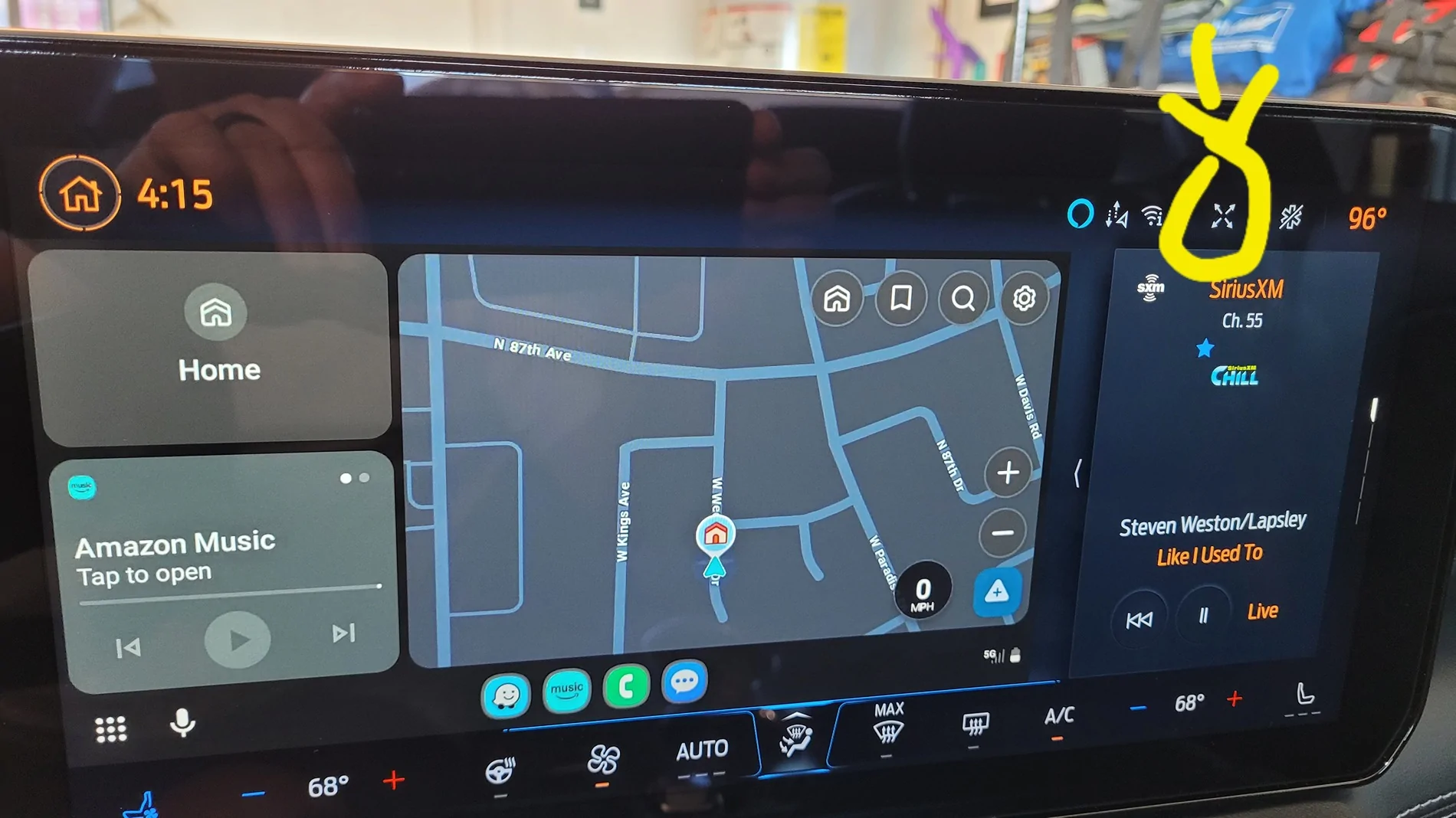
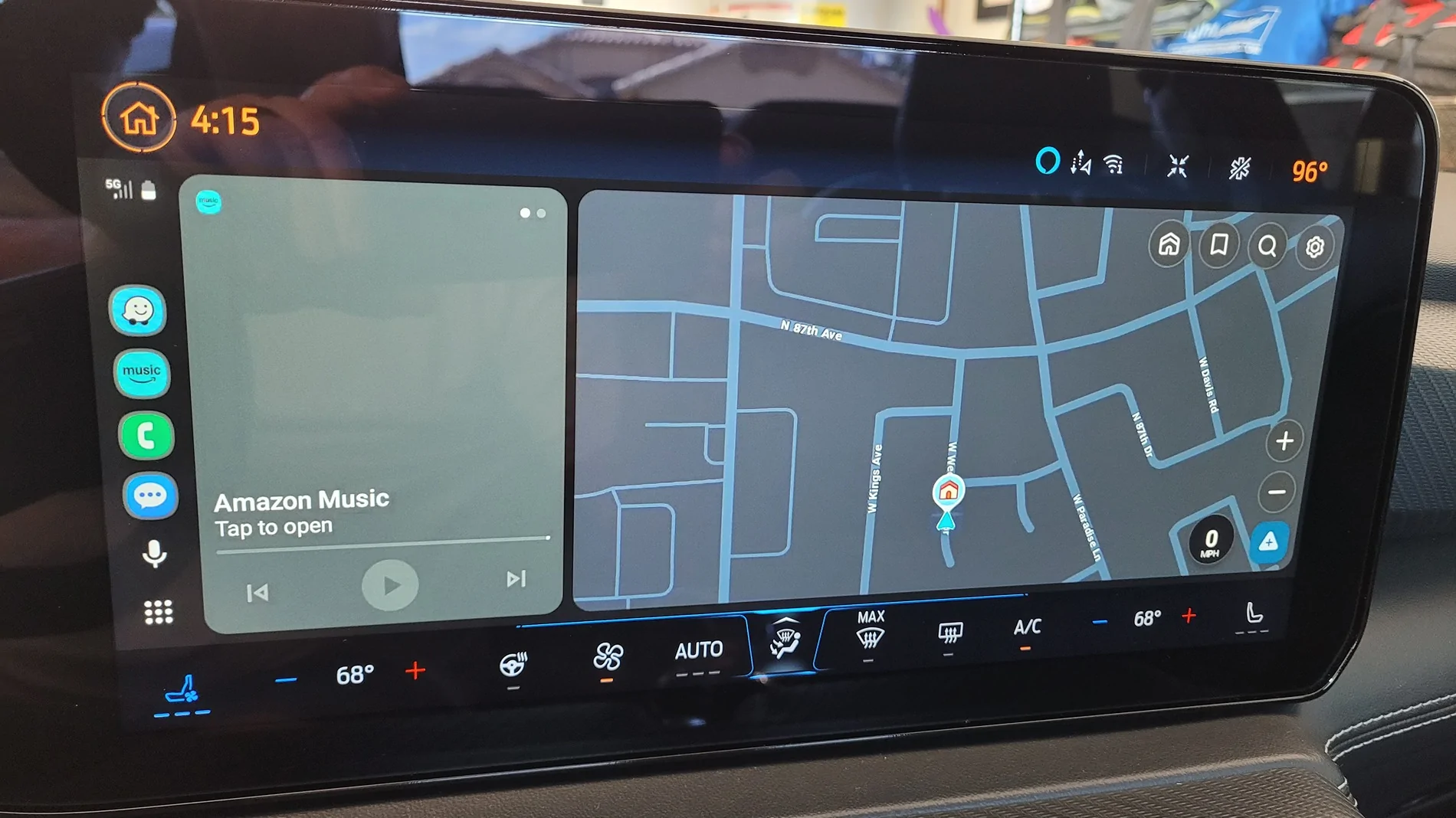
I'm not with my car right now and don't have a picture. But at the top right of the screen there is a button with 4 arrows. Push it, and it shrinks the main center screen a little and adds a 3rd side screen on the far right. You can then scroll the side screen for 5 different display options.
Sponsored


DT-GT

Well-Known Member
Joined
Apr 28, 2023
Threads
13
Messages
546
Reaction score
917
Location
Colorado
Vehicle(s)
2025 Mustang GT
Thanks. I’ll check that out later today.
 

Katzenjammer

Well-Known Member
Joined
May 25, 2025
Threads
2
Messages
60
Reaction score
47
Location
85629
Vehicle(s)
2024 Mustang GT
Thanks for this!

Two things:
1) I felt like seat cooling/heating switches automatically, but maybe not. Heating is needed so seldom here in southern AZ, I may have turned it on manually by accident while adjusting temperature.
2) The manual - ptooey! Example: The illustration of the windshield wiper stalk shows all the positions/modes except OFF. When I first took the car through the car wash, they had a large sign warning you to turn off automatic wipers. I immediately had a panic attack trying to recall if the automatics were always engaged in the off position or not.
 

steveo1960

Well-Known Member
Joined
Apr 1, 2018
Threads
46
Messages
1,035
Reaction score
947
Location
USA
Vehicle(s)
2024 Mustang GT Premium 401a, Auto, AE, Atlas Blue
The manual blows dude. There is sooo much stuff that isnt covered.

You know you can set it to 3 windows by shrinking the main screen right?
I didn't know that!
Thanks.
 

DT-GT

Well-Known Member
Joined
Apr 28, 2023
Threads
13
Messages
546
Reaction score
917
Location
Colorado
Vehicle(s)
2025 Mustang GT
I was able to get three screens in full Sync4 mode. When using Apple CarPlay I only get two screens max, which is what I use almost exclusively. I really don’t care for the built-in Sync4 navigation. Guess we all get used to certain things and mostly stick with it. I’d like to hide the Sync4 Nav completely, but cannot figure out how to remove it as one of the option on the right side screens.
I'm not with my car right now and don't have a picture. But at the top right of the screen there is a button with 4 arrows. Push it, and it shrinks the main center screen a little and adds a 3rd side screen on the far right. You can then scroll the side screen for 5 different display options.


dmwphoto

Well-Known Member
Joined
Aug 29, 2025
Threads
2
Messages
83
Reaction score
135
Location
Longs, SC
Vehicle(s)
2024 Chevrolet Corvette HTC, 2025 Mustang GT Premium
You can expand your Apple CarPlay map to take up the whole screen. That will eliminate the Sync nav
 

DT-GT

Well-Known Member
Joined
Apr 28, 2023
Threads
13
Messages
546
Reaction score
917
Location
Colorado
Vehicle(s)
2025 Mustang GT
Yep. Thanks. I normally have it displaying my CarPlay navigation along with my SXM on the right. I’d just like to hide the Sync4 Nav completely so that it’s not even one of the options for the right display.
You can expand your Apple CarPlay map to take up the whole screen. That will eliminate the Sync nav
 
Last edited:

Kitulu

Well-Known Member
Joined
Aug 24, 2024
Threads
15
Messages
134
Reaction score
154
Location
United States
Vehicle(s)
2024 Mustang GT Premium Rapid Red
I don't mean to jump ship here, but I'm sort of surprised to see anyone still subscribing to SiriusXM. I am aware of their content, but I'm much more aware of their cost-benefit scenario too. For me, there are a ton of less-costly streaming content.
I let the initial subscription lapse and ignored the offers until they got down to $4/month.
 

DT-GT

Well-Known Member
Joined
Apr 28, 2023
Threads
13
Messages
546
Reaction score
917
Location
Colorado
Vehicle(s)
2025 Mustang GT
I like to cruise on the backroads (not interstates) in the western US and find that streaming doesn’t work in MANY locations. I have music on my phone and also a thumb drive (My Pony Music), but sometimes I like to stream things other than music. Once I got an acceptable price for SXM and did t have to play their pricing games I really like having it available in my car and also on my phone at home.

I even download maps for large areas that I will be traveling so that I have detailed maps even when off-line. Works well.
I don't mean to jump ship here, but I'm sort of surprised to see anyone still subscribing to SiriusXM. I am aware of their content, but I'm much more aware of their cost-benefit scenario too. For me, there are a ton of less-costly streaming content.
 

DT-GT

Well-Known Member
Joined
Apr 28, 2023
Threads
13
Messages
546
Reaction score
917
Location
Colorado
Vehicle(s)
2025 Mustang GT
Wow! I don’t have such a button. You seem to have much more flexibility with displays than do I. Are you Android? If do, perhaps that’s the difference.
 

DT-GT

Well-Known Member
Joined
Apr 28, 2023
Threads
13
Messages
546
Reaction score
917
Location
Colorado
Vehicle(s)
2025 Mustang GT
And I don’t have that “96” on my screen either, but I can do without that. 😉🙃😊
 

DT-GT

Well-Known Member
Joined
Apr 28, 2023
Threads
13
Messages
546
Reaction score
917
Location
Colorado
Vehicle(s)
2025 Mustang GT
Ahhh. Just learned that I can and should make changes to CarPlay apps and widgets on my phone to personalize the display in the car. Must do it when not connected to the car. Will see if this gives me more options on the car.
 

steveo1960

Well-Known Member
Joined
Apr 1, 2018
Threads
46
Messages
1,035
Reaction score
947
Location
USA
Vehicle(s)
2024 Mustang GT Premium 401a, Auto, AE, Atlas Blue
If anyone knows how to remove the Sirius/XM info advertising channel 1 from favorites please let me know. It doesn't show up in either the Sirius favorites nor the Sync favorites so I cannot overwrite it with another channel as I know deleting a favorite is not possible.
 

Starship Enterprise

Well-Known Member
Joined
Jun 15, 2025
Threads
8
Messages
1,155
Reaction score
1,680
Location
MD
Vehicle(s)
2025 Mustang GT Premium
If anyone knows how to remove the Sirius/XM info advertising channel 1 from favorites please let me know. It doesn't show up in either the Sirius favorites nor the Sync favorites so I cannot overwrite it with another channel as I know deleting a favorite is not possible.
I’m having a little trouble following your question. You should be able to press and hold any favorite channel to add the current station you are listening to in it’s place. I overwrote mine With another channel.

As far as I know, you can’t delete a favorite, only overwrite it. But you can also go into the options screen to add more favorites pages.
Sponsored


Top