Sponsored

Audio Source Button?

rixretired

Active Member
Joined
Jul 16, 2024
Threads
2
Messages
30
Reaction score
31
Location
Virginia
Vehicle(s)
2024 Mustang GT Prem, 401A, Brembo, Bronze, AE
Just took delivery of a GT Premium, w/401a, Vapor Blue, Bronze Pkg, Brembo’s, Active Exhaust, 10 spd auto. It’s my toy and our family’s 3rd mustang. A ’68 and a ‘73 were the first 2, but that was in the last century. The only thing they have in common with this one is the nameplate.
Anyway I have Sync 3 in my Aviator, but Sync 4 is killing me. Everytime I get into the car, it connects to my iPhone. The Owners Manual on page 388 says there is an audio source button, which I have failed to locate. All I want to do is change the source, and tune a station without going thru the touch screen. While I can change the source using the steering wheel controls, Changing the station seems to require me to go to the touch screen. My Sync 3 Lincoln allows me to do it all from the steering wheel. How is this an improvement.
What am I missing? Any help would be appreciated.
BTW this car slaps a smile in my face when I’m in it …. Except for the damn radio.
Sponsored
 
  • Like
Reactions: DCS

Michael_GT

Member
Joined
Jul 31, 2024
Threads
1
Messages
6
Reaction score
2
Location
Virginia
Vehicle(s)
2024 Ford Mustang GT, Vapor Blue, 401a, 10R80, AVE
You can always use the voice assistant. Just press (not hold) the voice button on the steering wheel and say “SiriusXM Classic Rock” or something along those lines.
 

LETHAL

From the D but in the NC
Joined
Sep 25, 2015
Threads
13
Messages
1,651
Reaction score
1,030
Location
From the D to NC
Vehicle(s)
2024 Mustang GT
Sometimes the source button is there on the home screen. Other times, it is not, and it is annoying AF!
 
OP
OP
rixretired

rixretired

Active Member
Joined
Jul 16, 2024
Threads
2
Messages
30
Reaction score
31
Location
Virginia
Vehicle(s)
2024 Mustang GT Prem, 401A, Brembo, Bronze, AE
You can always use the voice assistant. Just press (not hold) the voice button on the steering wheel and say “SiriusXM Classic Rock” or something along those lines.
That’s a thought, thanks I’ll try it.
 

smurfslayer

Well-Known Member
Joined
Jul 11, 2024
Threads
8
Messages
1,516
Reaction score
1,907
Location
Texas
Vehicle(s)
2017 Raptor
On the right screen, press on the audio widget to bring up the traditional sync3 audio screen; source button is there


samson

Well-Known Member
Joined
Mar 21, 2023
Threads
36
Messages
920
Reaction score
877
Location
Maryland
Vehicle(s)
'24 GT Convertible 401A, AVE, Brembos
I use the voice assistant. Just easier and less distracting than trying to navigate the screen while driving. And yes mine does the same thing on Android Auto. Immediately starts up Pandora as soon as I start it up.
 
OP
OP
rixretired

rixretired

Active Member
Joined
Jul 16, 2024
Threads
2
Messages
30
Reaction score
31
Location
Virginia
Vehicle(s)
2024 Mustang GT Prem, 401A, Brembo, Bronze, AE
On the right screen, press on the audio widget to bring up the traditional sync3 audio screen; source button is there
Thanks, found it. Also was able to lock in some presets. It looks like the number of presets is limited to about 6. Seems like a low number to me. My Lincoln has a bunch of presets for each source.
 

roadpilot

Well-Known Member
Joined
Feb 12, 2024
Threads
9
Messages
3,260
Reaction score
3,697
Location
Michigan
Vehicle(s)
21 F150 Platinum, 16 ATS4, 14 LTZ
You can increase/decrease the number of presets with FORScan, but you may be able to do it from the Sync screen (don't recall).

I think mine defaulted to three rows of presets.

To get to the other rows of presets, tap/hold/slide to the left or right to reveal more.
 

Stangerous

Well-Known Member
Joined
May 30, 2023
Threads
24
Messages
739
Reaction score
743
Location
Space Coast, Florida
Vehicle(s)
2024 Mustang GT Premium, 2020 Mustang GT Premium c
Just took delivery of a GT Premium, w/401a, Vapor Blue, Bronze Pkg, Brembo’s, Active Exhaust, 10 spd auto. It’s my toy and our family’s 3rd mustang. A ’68 and a ‘73 were the first 2, but that was in the last century. The only thing they have in common with this one is the nameplate.
Anyway I have Sync 3 in my Aviator, but Sync 4 is killing me. Everytime I get into the car, it connects to my iPhone. The Owners Manual on page 388 says there is an audio source button, which I have failed to locate. All I want to do is change the source, and tune a station without going thru the touch screen. While I can change the source using the steering wheel controls, Changing the station seems to require me to go to the touch screen. My Sync 3 Lincoln allows me to do it all from the steering wheel. How is this an improvement.
What am I missing? Any help would be appreciated.
BTW this car slaps a smile in my face when I’m in it …. Except for the damn radio.
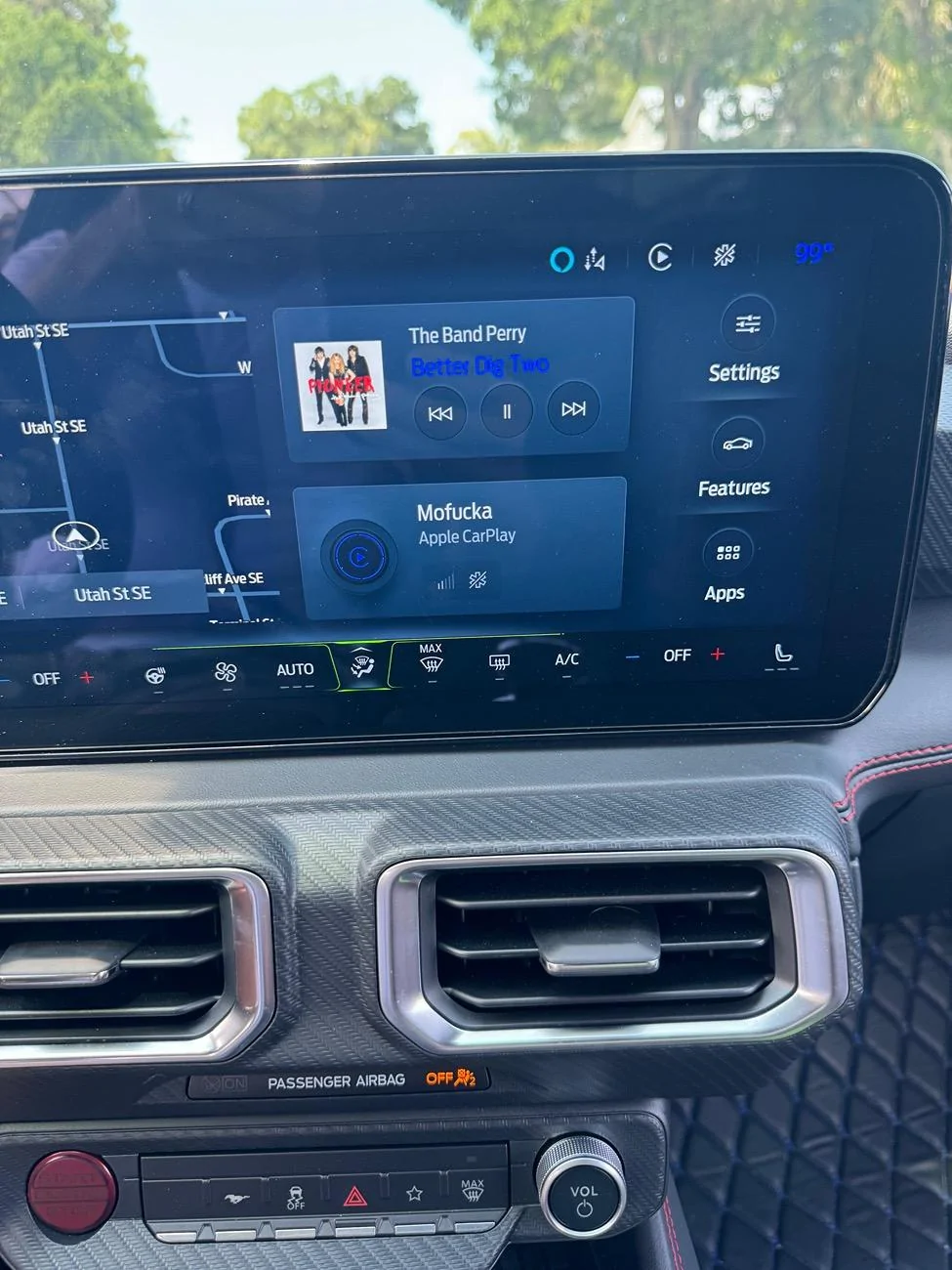
If you tap the area that shows what’s playing you will find the source button.

S650 Mustang Audio Source Button? IMG_6396
 

Michael_GT

Member
Joined
Jul 31, 2024
Threads
1
Messages
6
Reaction score
2
Location
Virginia
Vehicle(s)
2024 Ford Mustang GT, Vapor Blue, 401a, 10R80, AVE
You can increase/decrease the number of presets with FORScan, but you may be able to do it from the Sync screen (don't recall).

I think mine defaulted to three rows of presets.

To get to the other rows of presets, tap/hold/slide to the left or right to reveal more.
Do you know how to make sync default to last audio option as opposed to wireless CarPlay every time?
 

roadpilot

Well-Known Member
Joined
Feb 12, 2024
Threads
9
Messages
3,260
Reaction score
3,697
Location
Michigan
Vehicle(s)
21 F150 Platinum, 16 ATS4, 14 LTZ
Do you know how to make sync default to last audio option as opposed to wireless CarPlay every time?
1. Start car
2. Move shifter to 'D'
3. Drive down the road at a decent speed
4. Roll down window
5. Toss that piece of crap iPhone out of the open window

No more CarPlay!

Seriously, I think it will go to CarPlay/AA if your phone connects to it. IIRC, that's been a question/complaint for a while.
 

kinelisch

Well-Known Member
Joined
Jun 20, 2024
Threads
38
Messages
509
Reaction score
469
Location
USA
Vehicle(s)
2024 Mustang GT Premium
I also find it annoying but I discovered that if you press the voice assistant button on the right side of the steering wheel and then say "FM 95.1" it will change to that.
 

NegativeMultiplier

Well-Known Member
Joined
Oct 24, 2022
Threads
9
Messages
509
Reaction score
545
Location
-
Vehicle(s)
-
Do you know how to make sync default to last audio option as opposed to wireless CarPlay every time?
It sounds like this issue is occurring because CarPlay is overriding the SYNC system when your iPhone pairs, correct? If that's true, do this while CarPlay is running.

Home Button --> Settings --> Phone List --> Tap the phone, media, or CarPlay button next to your phone's name

Following the above steps should result in the CarPlay icon un-highlighting itself, and the Phone and Media icons highlighting themselves. Note that from this point forward, CarPlay will no longer automatically turn itself on when you turn on the car. It will default to whatever your last media source was.

If you ever want to turn CarPlay on again, follow the above steps, except this time tap on CarPlay so it's highlighted again. CarPlay will load, but it will also load every time you enter the vehicle once again.
 

Michael_GT

Member
Joined
Jul 31, 2024
Threads
1
Messages
6
Reaction score
2
Location
Virginia
Vehicle(s)
2024 Ford Mustang GT, Vapor Blue, 401a, 10R80, AVE
It sounds like this issue is occurring because CarPlay is overriding the SYNC system when your iPhone pairs, correct? If that's true, do this while CarPlay is running.

Home Button --> Settings --> Phone List --> Tap the phone, media, or CarPlay button next to your phone's name

Following the above steps should result in the CarPlay icon un-highlighting itself, and the Phone and Media icons highlighting themselves. Note that from this point forward, CarPlay will no longer automatically turn itself on when you turn on the car. It will default to whatever your last media source was.

If you ever want to turn CarPlay on again, follow the above steps, except this time tap on CarPlay so it's highlighted again. CarPlay will load, but it will also load every time you enter the vehicle once again.
Id prefer not to turn CarPlay off but to have Siriusxm going instead when I turn on the car if I had it on last. I’m being too picky lol
 
OP
OP
rixretired

rixretired

Active Member
Joined
Jul 16, 2024
Threads
2
Messages
30
Reaction score
31
Location
Virginia
Vehicle(s)
2024 Mustang GT Prem, 401A, Brembo, Bronze, AE
Id prefer not to turn CarPlay off but to have Siriusxm going instead when I turn on the car if I had it on last. I’m being too picky lol
It would be nice if the documentation that didn‘t come in the form of an owners manual in the glove box, explained some of this. I’m still looking for the source icon shown in the pdf owners manual. Like you would expect it to be on the Home Screen, and set to the last source used. That would certainly solve this issue.
Sponsored


Top