Sponsored

SYNC Navigation Map - Night/Dark mode only

Zig

Well-Known Member
Joined
Jul 21, 2023
Threads
36
Messages
4,608
Reaction score
2,482
Location
Virginia
Vehicle(s)
‘24 F350 cclb drw fx4 6.7ho, ‘24 gt pp, ‘05 c6 f55, ‘01 fatboy, ‘03 sprtstr
As it has transpired Ford did away with that Day - Night - Auto option in the Sync4 menu for all the Mustangs. Strange and unnecessary but that's how it is.

On another note my car shows an error message at every start (see pic).
I don't need that crap and I am sure that emergency call feature can also be disabled using ForScan.

Sorry for bothering you again but maybe you the module and the code to have it permanently disabled.

Thanks, Roland

PXL_20260525_115322289.webp
Must be a mustang thing, our f-350 (‘24) nav seems to have the day/night mode.
Sponsored


Zig

Well-Known Member
Joined
Jul 21, 2023
Threads
36
Messages
4,608
Reaction score
2,482
Location
Virginia
Vehicle(s)
‘24 F350 cclb drw fx4 6.7ho, ‘24 gt pp, ‘05 c6 f55, ‘01 fatboy, ‘03 sprtstr
I don't see anything else in the APIM or IPC that corrolates to this. Not to say there isn't anything else, but I went cross-eyed looking at every feature code on the spreadsheet and I didn't see anything.

I asked one of the gurus on the F150 forum and he said a lot of these things are defined by the vehicle type itself, so it may not work. With that said, I would try changing this value to something other than a Mustang to see what happens. My F150 shows a 1 there and I have the unreal theme enabled in the APIM so I have HVAC controls on the touchscreen like these cars do, so it's worth a shot. Maybe try a 0 for "classic" which I am not sure what that is, but if Smart Surface doesn't display properly, you could try that, too. If this doesn't work, then I am out of ideas.

1779902466872-0p.webp


Edit: Making this change may cause a loss of many Mustang specific features in the APIM. Even if you gain the day/night mode feature, you may lose other things. It can easily be changed back if you don't get the desired result.
Why are we looking at an f150 shouldn’t we wonder if the mach-e does the day/night mode, since it’s also a ‘mustang’? I mean the truck might have a bed cam which isn’t really the same as a trunk cam or even a 4wd toggle which then sends us back to the software v hardware v only applies if applicable (are we hearing electric sounds or not - oh wait different thread). Anywho, is sync 4 nav vehicle dependent (as in requires an ambient sensor in order to determine if the map should be night mode when the headlights are on) or is it simply a software rule that flips the switch based upon the switch (headlight) setting?
 

GrabThatBlue

Well-Known Member
Joined
Jan 13, 2025
Threads
36
Messages
2,327
Reaction score
2,499
Location
Between Canada and Europe
Vehicle(s)
Mustang GT Premium, 401A, 10R80, PP, AE, NPP, MR, Recaro
Why are we looking at an f150 shouldn’t we wonder if the mach-e does the day/night mode, since it’s also a ‘mustang’? I mean the truck might have a bed cam which isn’t really the same as a trunk cam or even a 4wd toggle which then sends us back to the software v hardware v only applies if applicable (are we hearing electric sounds or not - oh wait different thread). Anywho, is sync 4 nav vehicle dependent (as in requires an ambient sensor in order to determine if the map should be night mode when the headlights are on) or is it simply a software rule that flips the switch based upon the switch (headlight) setting?
Why are we looking at the F150? Because most of the information on Forscan we learned about the Mustang comes from comparing it with the F150.

Another drunk message from Zig.
 

Zig

Well-Known Member
Joined
Jul 21, 2023
Threads
36
Messages
4,608
Reaction score
2,482
Location
Virginia
Vehicle(s)
‘24 F350 cclb drw fx4 6.7ho, ‘24 gt pp, ‘05 c6 f55, ‘01 fatboy, ‘03 sprtstr
Why are we looking at the F150? Because most of the information on Forscan we learned about the Mustang comes from comparing it with the F150.

Another drunk message from Zig.
Just because the engine may be the same doesn’t automatically imply the software is as well.


Zig

Well-Known Member
Joined
Jul 21, 2023
Threads
36
Messages
4,608
Reaction score
2,482
Location
Virginia
Vehicle(s)
‘24 F350 cclb drw fx4 6.7ho, ‘24 gt pp, ‘05 c6 f55, ‘01 fatboy, ‘03 sprtstr

rugedraw

Well-Known Member
Joined
Apr 17, 2024
Threads
1
Messages
460
Reaction score
569
Location
Miami, FL
Vehicle(s)
2021 F150 701a 3.5tt 4x4; 2023 Bronco Sport Badlands; 1991 Mustang 5.0 coupe
Why are we looking at an f150 shouldn’t we wonder if the mach-e does the day/night mode, since it’s also a ‘mustang’? I mean the truck might have a bed cam which isn’t really the same as a trunk cam or even a 4wd toggle which then sends us back to the software v hardware v only applies if applicable (are we hearing electric sounds or not - oh wait different thread). Anywho, is sync 4 nav vehicle dependent (as in requires an ambient sensor in order to determine if the map should be night mode when the headlights are on) or is it simply a software rule that flips the switch based upon the switch (headlight) setting?
I was looking at the Mustang spreadsheet and referenced my truck to see how it was configured to see if my recommendations made sense to try.

Is a mach-e mustang closer in function than a f-150?
Not really. 21-23 F150 and Mach E are almost identical in module architecture. 2024+ is where the second gen Sync 4 with TRON and an IPC managed by the APIM came to into play, but the F150 and Mach E of these years are still more alike than these cars. Since the F150 offers hybrid and full EVs and Bluecruise, they are actually a lot more alike each other than the Mustang is.

These vehicles are kind of in a class by themselves which is what makes enabling things in these trickier.
 

rugedraw

Well-Known Member
Joined
Apr 17, 2024
Threads
1
Messages
460
Reaction score
569
Location
Miami, FL
Vehicle(s)
2021 F150 701a 3.5tt 4x4; 2023 Bronco Sport Badlands; 1991 Mustang 5.0 coupe
As it has transpired Ford did away with that Day - Night - Auto option in the Sync4 menu for all the Mustangs. Strange and unnecessary but that's how it is.

On another note my car shows an error message at every start (see pic).
I don't need that crap and I am sure that emergency call feature can also be disabled using ForScan.

Sorry for bothering you again but maybe you know which module and the code to have it permanently disabled.

Thanks, Roland
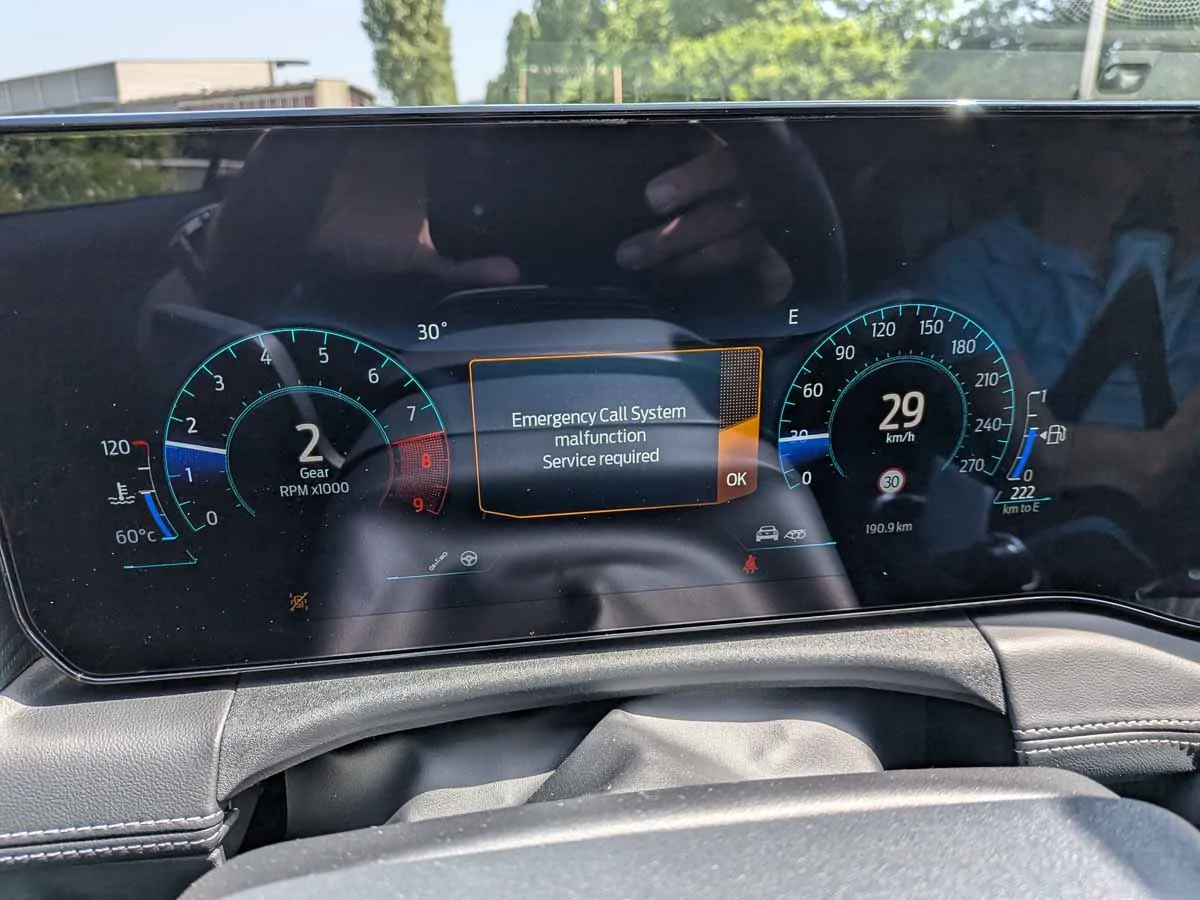
I'll look into that pop up, but for clarification, did you try changing the vehicle type from Mustang to classic or smart surface?
 
OP
OP
Rolinuss

Rolinuss

Member
Joined
May 17, 2026
Threads
1
Messages
10
Reaction score
6
Location
Switzerland
Vehicle(s)
S650 vert
No I didn't. Don't wanted the car to think it's a truck or something if you know what I mean. You think I shall give it try?

As for the EMC I have found the following:
TCU
754-02-01
and
IPC 720-09-02
Both allow to disable the Emergency call feature and I guess the TCU entry will kill it all.
 

Zig

Well-Known Member
Joined
Jul 21, 2023
Threads
36
Messages
4,608
Reaction score
2,482
Location
Virginia
Vehicle(s)
‘24 F350 cclb drw fx4 6.7ho, ‘24 gt pp, ‘05 c6 f55, ‘01 fatboy, ‘03 sprtstr
I was looking at the Mustang spreadsheet and referenced my truck to see how it was configured to see if my recommendations made sense to try.


Not really. 21-23 F150 and Mach E are almost identical in module architecture. 2024+ is where the second gen Sync 4 with TRON and an IPC managed by the APIM came to into play, but the F150 and Mach E of these years are still more alike than these cars. Since the F150 offers hybrid and full EVs and Bluecruise, they are actually a lot more alike each other than the Mustang is.

These vehicles are kind of in a class by themselves which is what makes enabling things in these trickier.
The ‘24 f350 has build in nav sync 4 with day/night mode as well. Is the software or the hardware the determining factor? Granted software without corresponding hardware doesn’t do much good, however the comment was in reference the ‘model’, heck even the fordpass app shows the mach-e as the vehicle on the tire pressure screen. Would inquiry into the software settings for a mach-e apply to the same named vehicle or should we look into lincoln creature comfort extras? Heck even the tilt on reverse is a potential setting (same as auto fold on lock) but that don’t automatically infer it applies.
 

rugedraw

Well-Known Member
Joined
Apr 17, 2024
Threads
1
Messages
460
Reaction score
569
Location
Miami, FL
Vehicle(s)
2021 F150 701a 3.5tt 4x4; 2023 Bronco Sport Badlands; 1991 Mustang 5.0 coupe
No I didn't. Don't wanted the car to think it's a truck or something if you know what I mean. You think I shall give it try?

As for the EMC I have found the following:
TCU
754-02-01
and
IPC 720-09-02
Both allow to disable the Emergency call feature and I guess the TCU entry will kill it all.
I would try it, but I am the FAFO type.

Yea, that IPC setting looks correct. I would only disable the warning in the IPC and leave the TCU alone.

The ‘24 f350 has build in nav sync 4 with day/night mode as well. Is the software or the hardware the determining factor? Granted software without corresponding hardware doesn’t do much good, however the comment was in reference the ‘model’, heck even the fordpass app shows the mach-e as the vehicle on the tire pressure screen. Would inquiry into the software settings for a mach-e apply to the same named vehicle or should we look into lincoln creature comfort extras? Heck even the tilt on reverse is a potential setting (same as auto fold on lock) but that don’t automatically infer it applies.
I doubt it is a hardware issue why this doesn't work on these cars. I still think it has to do with the display type being set to Mustang and day/night is coded out of that display setting. The Super Duty and F150 have this set to smart surface and the Mach E has it set to classic. The Lighting with either the small or large screen also has it set to smart surface. The 2025 Bronco Sport that just got Sync 4 and has a horizontal screen like the Mustang does also has it set to smart surface.

I tried to enable mirror tilt on reverse on my girl's Bronco Sport and I can get the toggle to show up on the touchscreen, but it won't turn on even after I enabled it in the door modules. Some things just won't work even though everything needed for it to work is seemingly there. The only way to find out is to try. It just depends how far down the rabbit hole people are willing to.
 
  • Like
Reactions: Zig

Zig

Well-Known Member
Joined
Jul 21, 2023
Threads
36
Messages
4,608
Reaction score
2,482
Location
Virginia
Vehicle(s)
‘24 F350 cclb drw fx4 6.7ho, ‘24 gt pp, ‘05 c6 f55, ‘01 fatboy, ‘03 sprtstr
I would try it, but I am the FAFO type.

Yea, that IPC setting looks correct. I would only disable the warning in the IPC and leave the TCU alone.


I doubt it is a hardware issue why this doesn't work on these cars. I still think it has to do with the display type being set to Mustang and day/night is coded out of that display setting. The Super Duty and F150 have this set to smart surface and the Mach E has it set to classic. The Lighting with either the small or large screen also has it set to smart surface. The 2025 Bronco Sport that just got Sync 4 and has a horizontal screen like the Mustang does also has it set to smart surface.

I tried to enable mirror tilt on reverse on my girl's Bronco Sport and I can get the toggle to show up on the touchscreen, but it won't turn on even after I enabled it in the door modules. Some things just won't work even though everything needed for it to work is seemingly there. The only way to find out is to try. It just depends how far down the rabbit hole people are willing to.
I also doubt it’s a hardware issue since the carplay/android nav switches accordingly.
 

rugedraw

Well-Known Member
Joined
Apr 17, 2024
Threads
1
Messages
460
Reaction score
569
Location
Miami, FL
Vehicle(s)
2021 F150 701a 3.5tt 4x4; 2023 Bronco Sport Badlands; 1991 Mustang 5.0 coupe
I have an idea. I don't have a Mustang that I can change the APIM to an F150, but I have an F150 I can change into a Mustang. 🤣

Stand by. Firing up my laptop now.
 

rugedraw

Well-Known Member
Joined
Apr 17, 2024
Threads
1
Messages
460
Reaction score
569
Location
Miami, FL
Vehicle(s)
2021 F150 701a 3.5tt 4x4; 2023 Bronco Sport Badlands; 1991 Mustang 5.0 coupe
Ok, so I changed it from smart surface to mustang. The screen didn't render correctly due to the difference in screen size. So in this first video, I was not able to get into the display settings to change it from light to dark, so I say in the video that it won't work on the Mustang.


In this second video, I changed the VDV settings to get the screen to render right. I was able to navigate to the display settings and change it from day to night to auto, but the screen stayed in day mode. So at the end, I say that it cannot be done with the APIM set to Mustang.


However, when I changed the VDV back to what my truck is supposed to be, I messed it with a bit more while the APIM was still set to Mustang and viola! It allowed me to change it from day to night and to auto with the APIM still set to a Mustang.


So, in conclusion: Idk WTF is going on. lol I can change it between light and dark with the APIM set to be a Mustang with the screen rendering incorrectly. But, if I change the VDV so the screen renders somewhat correctly, it stays in day mode.

I can't tell if we are closer or further away from seing if this will work or not, but I still think it is worth changing the APIM from Mustang to Smart Surface and see what happens. There is only one VDV setting for a 13.2" screen, so if it does not render properly when set to Smart Surface, then I don't see a way to fix the rendering.

S650 Mustang SYNC Navigation Map - Night/Dark mode only 1780016301420-ca
 
Last edited:
  • Like
Reactions: Zig
OP
OP
Rolinuss

Rolinuss

Member
Joined
May 17, 2026
Threads
1
Messages
10
Reaction score
6
Location
Switzerland
Vehicle(s)
S650 vert
Thank you rugedraw.

But have a look at my car's APIM DMD options.

There is no specific code for a Mustang like in your APIM. Maybe it's because m car is MY26 but at the same time Sync4 is Sync4 und older versions get constantly updated. Who knows.

Looks like I'll have to try with 1 = Smart Surface Truck, correct?


S650 Mustang SYNC Navigation Map - Night/Dark mode only Screenshot 2026-05-29 053306
Sponsored

 
Last edited:


Top