Sponsored

Custom profiles just disappeared

Neco

Well-Known Member
Joined
Jan 11, 2026
Threads
1
Messages
47
Reaction score
33
Location
Spain
Vehicle(s)
S650DH
I wasn't sure where to post this, and if I should just take it as normal behaviour, or something is actually wrong.

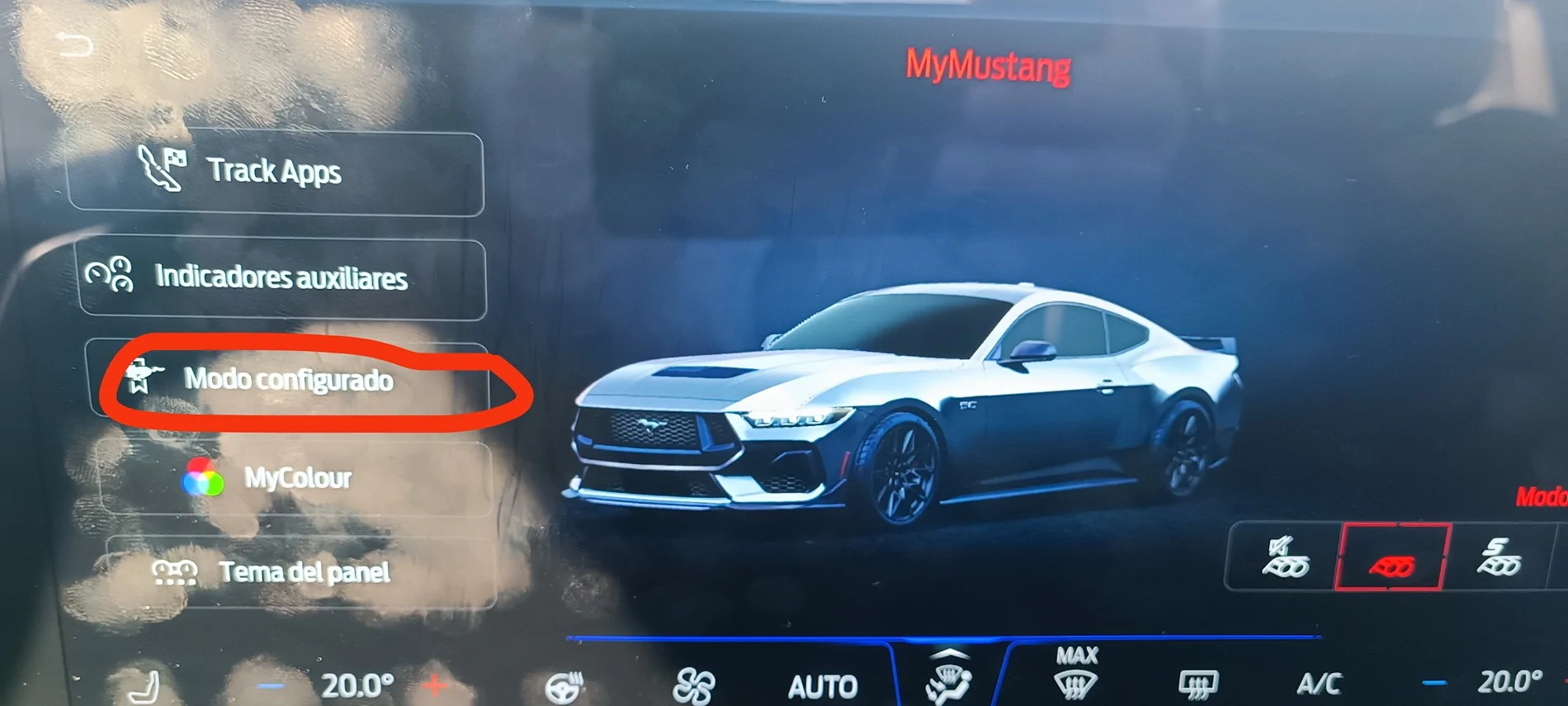
I recently bought a MY26 DH, and I'm sorry to say that almost didn't use it yet. Too much workload, and I own some other cars as daily. The point is that I still don't know it very well, but this glitch seems really weird, or maybe I'm just missing something. Have any of you seen the custom profiles configuration "button" just disappear from the screen? Or, being more precise not even appearing. Just gone. Only four buttons available when pushing the "my Mustang" button in the dash.

I turned contact off in a traffic light, wait as long as I could, turn it on again, and nothing, still four buttons. I parked the car for a while, like 15/20 minutes, turn it on, and voila! customisation button available again.

Are there ghost in my car, of this is the quality I could expect from SYNC infotainment system? I have never ever had such issue with any car before.
Sponsored

 

DarkHorsePremium

Well-Known Member
Joined
Mar 17, 2026
Threads
6
Messages
232
Reaction score
269
Location
CA, Bay Area
Vehicle(s)
2026 Dark Horse Premium, Blue Ember with Appearance Package, 10 spd AT
I was in my sync4 yesterday changing settings and I could swear I saw a Profiles option. Like you, I haven't bothered with them. I'm the driver 95% of the time. My wife wouldn't use them. She'd only be concerned with seat memory. I believe there are only three slots. Can you confirm that you are talking about user profiles and not about favorites? I'll look today.
 
OP
OP

Neco

Well-Known Member
Joined
Jan 11, 2026
Threads
1
Messages
47
Reaction score
33
Location
Spain
Vehicle(s)
S650DH
I was in my sync4 yesterday changing settings and I could swear I saw a Profiles option. Like you, I haven't bothered with them. I'm the driver 95% of the time. My wife wouldn't use them. She'd only be concerned with seat memory. I believe there are only three slots. Can you confirm that you are talking about user profiles and not about favorites? I'll look today.

I'm talking about the menu with 5 buttons you get when you push "my Mustang" button. With the track apps, aux indicators, profile configuration, my colour, and Speedo design selection. The profile configuration button just didn't show up, only 4 buttons available...

I've just tried again, and here they are all them, as always. Weird thing...

I could selec the custom profile with the steering wheel buttons, but with this silly way of doing things, I couldn't select the profile that I wanted, because you have to do that in the screen, using the missing button...

S650 Mustang Custom profiles just disappeared IMG_20260416_190238
 
OP
OP

Neco

Well-Known Member
Joined
Jan 11, 2026
Threads
1
Messages
47
Reaction score
33
Location
Spain
Vehicle(s)
S650DH
I was in my sync4 yesterday changing settings and I could swear I saw a Profiles option. Like you, I haven't bothered with them. I'm the driver 95% of the time. My wife wouldn't use them. She'd only be concerned with seat memory. I believe there are only three slots. Can you confirm that you are talking about user profiles and not about favorites? I'll look today.
By the way, I use the custom profile for just one single reason, because thats the way to avoid the start-stop nightmare. But as I have to select the custom profile anyway anytime I get into the car... It is also pointless, it's easier to just turn it off manually (just one click, switching from normal to custom needs two clicks...).

Ford... You're turning simple things into very complicated ones.
 

DarkHorsePremium

Well-Known Member
Joined
Mar 17, 2026
Threads
6
Messages
232
Reaction score
269
Location
CA, Bay Area
Vehicle(s)
2026 Dark Horse Premium, Blue Ember with Appearance Package, 10 spd AT
Thanks @Neco
I'm going to look more closely at this today. Fortunately I have a '26 DHP without start stop. I decided a long time ago that I wouldn't consider a car with this technology. The start feature at a signal for example is not fast enough for me. Not to mention the wear and tear this would put on a starter motor. Glad yours seems to be working now.


Yamazuki

Well-Known Member
Joined
May 14, 2025
Threads
4
Messages
431
Reaction score
655
Location
North Dakota, USA
Vehicle(s)
2024 Dark Horse, 2013 Ford Raptor, 2004 F150
I wasn't sure where to post this, and if I should just take it as normal behaviour, or something is actually wrong.

I recently bought a MY26 DH, and I'm sorry to say that almost didn't use it yet. Too much workload, and I own some other cars as daily. The point is that I still don't know it very well, but this glitch seems really weird, or maybe I'm just missing something. Have any of you seen the custom profiles configuration "button" just disappear from the screen? Or, being more precise not even appearing. Just gone. Only four buttons available when pushing the "my Mustang" button in the dash.

I turned contact off in a traffic light, wait as long as I could, turn it on again, and nothing, still four buttons. I parked the car for a while, like 15/20 minutes, turn it on, and voila! customisation button available again.

Are there ghost in my car, of this is the quality I could expect from SYNC infotainment system? I have never ever had such issue with any car before.

I ran into this on my '24 Dark Horse just yesterday! Looked all over for the Custom Profiles option, knowing it should be there somewhere. Could not locate it anywhere, despite still being able to select my last saved custom profile with the steering wheel buttons.

Soft reset on Sync did the trick.
Press and hold both the right arrow and volume down buttons on the steering wheel.
 

D/\rK•650

Well-Known Member
Joined
Aug 8, 2025
Threads
19
Messages
753
Reaction score
520
Location
California
Vehicle(s)
2025 Mustang DarkHorse
Yes this kind of thing does happen from time to time. You can try a reset with righ hand d pad button and volume down. Hold these down till it resets. That should help.
 
OP
OP

Neco

Well-Known Member
Joined
Jan 11, 2026
Threads
1
Messages
47
Reaction score
33
Location
Spain
Vehicle(s)
S650DH
Yes this kind of thing does happen from time to time. You can try a reset with righ hand d pad button and volume down. Hold these down till it resets. That should help.
That is so crazy...

I could understand it if this was a new model just launched, as just an early little software glitch which could happen and would be solved on a later update. But that's not the case. What makes me think that nobody will take of it, as it's just the way it is.

Another good reason to hate the "virtual" software buttons (I already hate them quite a little bit).
 

GrabThatBlue

Well-Known Member
Joined
Jan 13, 2025
Threads
36
Messages
2,328
Reaction score
2,500
Location
Between Canada and Europe
Vehicle(s)
Mustang GT Premium, 401A, 10R80, PP, AE, NPP, MR, Recaro
I had a different issue with custom profiles.
All custom profiles had the same dashboard style and if I changed the style, it changes them for every drive mode. It did this for 2 days and then it resetted.
 

npole

Well-Known Member
Joined
Jul 12, 2020
Threads
12
Messages
513
Reaction score
298
Location
Italy
Vehicle(s)
Mustang Dark Horse 2024
By the way, I use the custom profile for just one single reason, because thats the way to avoid the start-stop nightmare. But as I have to select the custom profile anyway anytime I get into the car... It is also pointless, it's easier to just turn it off manually (just one click, switching from normal to custom needs two clicks...).

Ford... You're turning simple things into very complicated ones.
ForScan is your friend (enabling to remember the last mode used, so you don't have to select custom at every start).
 

Zig

Well-Known Member
Joined
Jul 21, 2023
Threads
36
Messages
4,608
Reaction score
2,482
Location
Virginia
Vehicle(s)
‘24 F350 cclb drw fx4 6.7ho, ‘24 gt pp, ‘05 c6 f55, ‘01 fatboy, ‘03 sprtstr
I wasn't sure where to post this, and if I should just take it as normal behaviour, or something is actually wrong.

I recently bought a MY26 DH, and I'm sorry to say that almost didn't use it yet. Too much workload, and I own some other cars as daily. The point is that I still don't know it very well, but this glitch seems really weird, or maybe I'm just missing something. Have any of you seen the custom profiles configuration "button" just disappear from the screen? Or, being more precise not even appearing. Just gone. Only four buttons available when pushing the "my Mustang" button in the dash.

I turned contact off in a traffic light, wait as long as I could, turn it on again, and nothing, still four buttons. I parked the car for a while, like 15/20 minutes, turn it on, and voila! customisation button available again.

Are there ghost in my car, of this is the quality I could expect from SYNC infotainment system? I have never ever had such issue with any car before.
Almost wonder if a soc issue.
 
OP
OP

Neco

Well-Known Member
Joined
Jan 11, 2026
Threads
1
Messages
47
Reaction score
33
Location
Spain
Vehicle(s)
S650DH
ForScan is your friend (enabling to remember the last mode used, so you don't have to select custom at every start).
Thanks mate.

It's already writed on my TODO's list, just didn't have time yet to get my hands on it. I'm new on Ford, and all dongles and software I already own are for VAG cars. I still didn't even buy a Forscan compatible dongle. Currently looking at the OBDLINK MX+ (which looks good, but seems a little bit on the expensive side to me) or the VLINKER FS (pretty affordable, and doesn't seem to be that bad, or worst than the MX+).

I could call myself as "advance user" after more that 20 years using VAGCOM (now VCDS) and I don't mind at all paying for a good dongle, I know it's worth it, but I can't really see so much difference on performance for such big difference on price (50€ Vs 150€).
 

npole

Well-Known Member
Joined
Jul 12, 2020
Threads
12
Messages
513
Reaction score
298
Location
Italy
Vehicle(s)
Mustang Dark Horse 2024


Top