I've never liked the constant GPS updating on the far right side of the screen. Most of my drives are well known, or I'm trying to get lost and enjoy the ride like it's 1996.
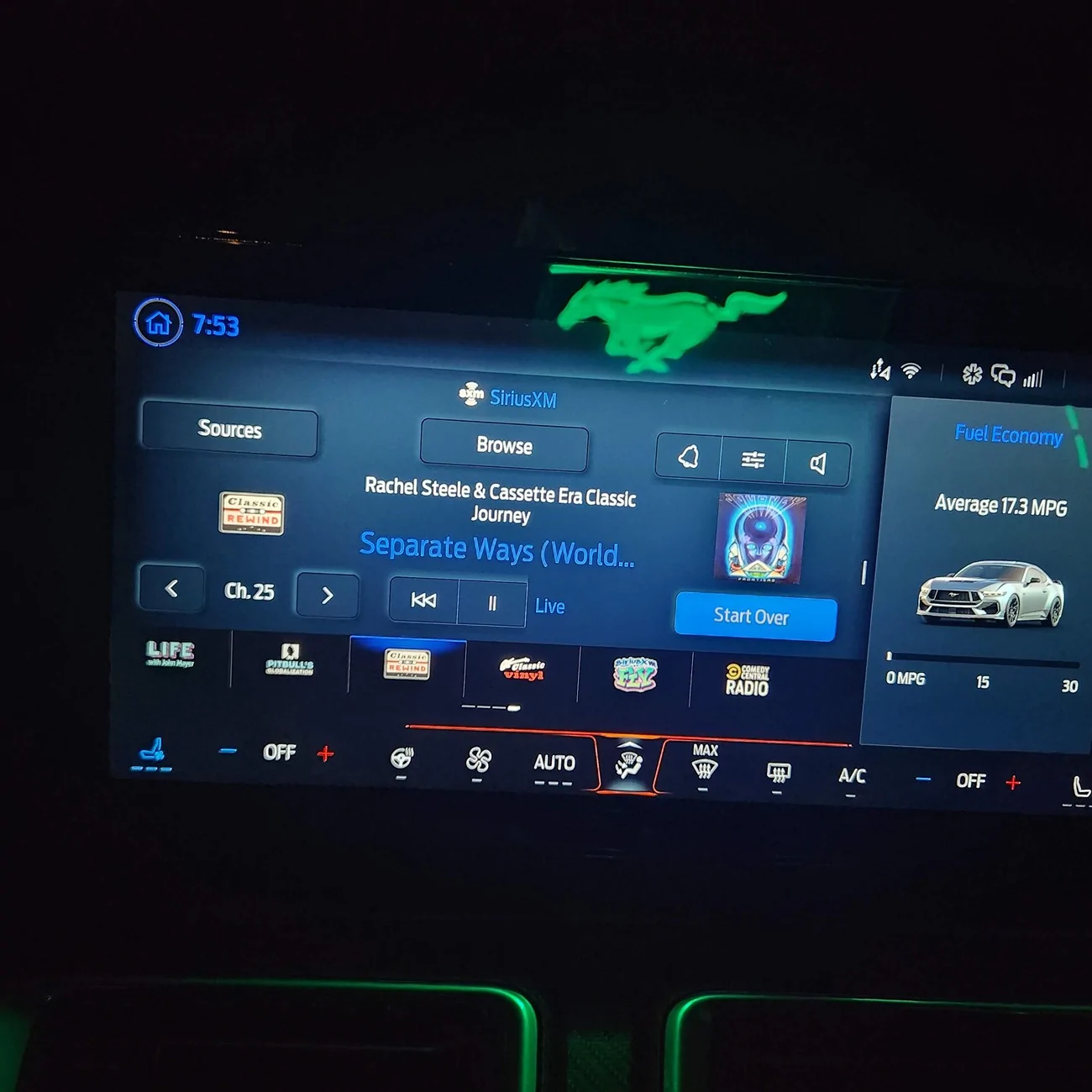
I went to turn on my wife's ventilated seat, and I missed. To my surprise, the Nav screen changed to something else. I know I should have read the hundreds of pages of the manual before I drove, but this was a nice surprise to me and I wanted to share with anyone else who wants to know. I don't care about the MPG, but I'd rather see that then an incessantly-updating map that I don't need. I think this is much less distracting.
Sorry for the crooked photo and the pony reflection from my Wind Restrictor. The daytime photos looked much worse.
I've never liked the constant GPS updating on the far right side of the screen. Most of my drives are well known, or I'm trying to get lost and enjoy the ride like it's 1996.
I went to turn on my wife's ventilated seat, and I missed. To my surprise, the Nav screen changed to something else. I know I should have read the hundreds of pages of the manual before I drove, but this was a nice surprise to me and I wanted to share with anyone else who wants to know. I don't care about the MPG, but I'd rather see that then an incessantly-updating map that I don't need. I think this is much less distracting.
Sorry for the crooked photo and the pony reflection from my Wind Restrictor. The daytime photos looked much worse.
So for my side topic of Sirius/XM not seeing the extra preset pages when using the steering wheel controls and the Channel 1 advertising appearing in the cycling but NO icon on the Favorites selections. I FINALLY figured it out. I had a favorite channel which at one time existed, maybe seasonal, but no longer existed. The normal icon for that channel was displayed, however when switching to it, the radio would go to the advertising Channel 1 and the steering wheel controls would just loop back the Preset 1 and never keep going.
I replaced the dead channel with one that exists and like magic everything works.
Key is that you won't see a Channel 1 icon anywhere and you have to make the connection as to what you tried to play when Channel 1 plays instead. Channel 1 seems to be the default when a preset channel no longer exists.
I never had the Ch 1 appear, but just yesterday I had to reprogram a favorite spot with another channel as the one that was there was seasonal. When a channel no longer exists it causes the scrolling through favorites to hang-up.
So for my side topic of Sirius/XM not seeing the extra preset pages when using the steering wheel controls and the Channel 1 advertising appearing in the cycling but NO icon on the Favorites selections. I FINALLY figured it out. I had a favorite channel which at one time existed, maybe seasonal, but no longer existed. The normal icon for that channel was displayed, however when switching to it, the radio would go to the advertising Channel 1 and the steering wheel controls would just loop back the Preset 1 and never keep going.
I replaced the dead channel with one that exists and like magic everything works.
Key is that you won't see a Channel 1 icon anywhere and you have to make the connection as to what you tried to play when Channel 1 plays instead. Channel 1 seems to be the default when a preset channel no longer exists.