Sponsored

iPhone Text Messages on dash screen?

Trella

Well-Known Member
Joined
Apr 29, 2025
Threads
22
Messages
117
Reaction score
112
Location
Rotonda Florida / From Chicago
Vehicle(s)
2024 Mustang GT Premium RTR Spec 2 / 2018 Mustang GT Premium / 2018 F-150 Sport
Can anyone tell me how, if possible, to get i Phone Text Messages to be displayed on dash screen? Thank You. VAT
Sponsored

 

DarkHorsePremium

Well-Known Member
Joined
Mar 17, 2026
Threads
6
Messages
240
Reaction score
280
Location
CA, Bay Area
Vehicle(s)
2026 Dark Horse Premium, Blue Ember with Appearance Package, 10 spd AT
Although I use Android Auto, I am familiar with Car Play also. When you pair your device with Car Play you have to agree to allow Car Play access to your messages. This allows read and reply. Keep in mind that your messages can then been seen by Ford, captured and sold to data brokers. The price we pay for convenience.

There are multiple places where you can control privacy settings. iOS and Android also allow you to set granular permissions by App. These are different.

When you add the device, you will be asked which permissions you want to grant the app. Access to contacts, access to messages, etc. That's on the App side.

Take a look at your Ford Pass App also. Click on your user account icon (top right hand corner). On that page select legal and privacy under Settings, then Privacy and Data Sharing. You'll be redirected to Ford.com. Log in if you aren't already. Look at Manage Data with Ford and Manage Data with Third Parties. Set your preferences.

For Ford, I have both options turned off. Your car and Ford app will notify you if there's a problem. You don't need personalized marketing or anyone seeing your speed, driving or braking habits. Like your insurance company.

For the third parties option, I allow Google Maps in the Ford Pass App. I can see my car's location if I want. However, I don't allow Maps to constantly track my location. In permissions, I only allow tracking when I'm using the app, and all of my travel history is deleted every 90 days. This is a matter of preference. Meaning if you are going to do something you shouldn't be doing, don't take your phone or your GPS equipped vehicle. Unless you don't care if your phone or car places "you" at the scene of the crime. 🤣

If you've already paired the device and missed the settings, just delete it from the car and repair it. I think there are privacy toggles in the car too, so review those settings as well to ensure your desired privacy settings are honored.

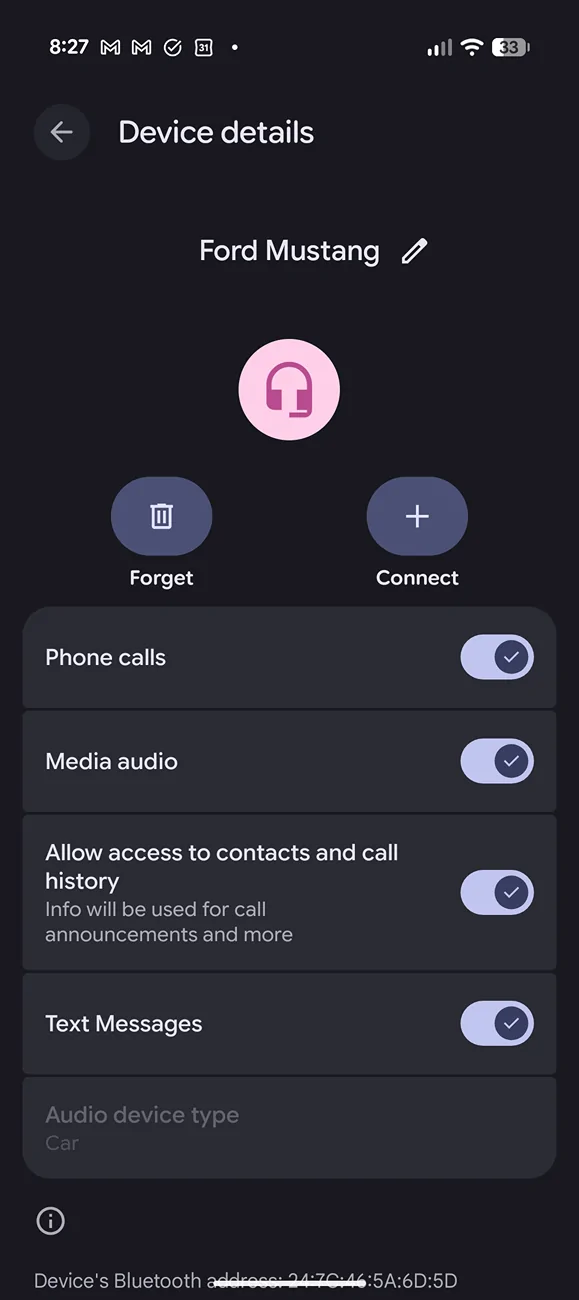
Here's a App permissions example in Android. (Apple is the same). I've paired my phone to the car using Bluetooth. When I review the permissions, I have granted my Apps access (CarPlay or Android Auto) to contacts, messages, media (music), etc.


S650 Mustang iPhone Text Messages on dash screen? Screenshot_20260613-082753
 
Last edited:

BrownsReds

Well-Known Member
Joined
Oct 9, 2024
Threads
1
Messages
81
Reaction score
102
Location
Maryland
Vehicle(s)
2024 Mustang GT Premium
Can anyone tell me how, if possible, to get i Phone Text Messages to be displayed on dash screen? Thank You. VAT
Don't think you can get the text message to show, only read to you. It would be very distracting to have the text displayed.
 

MidwayJ

Well-Known Member
Joined
Sep 9, 2018
Threads
4
Messages
882
Reaction score
611
Location
Dallas, Texas
Vehicle(s)
2019 Mustang GT Coupe, 2013 Honda CR-V, 2009 Ford Fusion
Can anyone tell me how, if possible, to get i Phone Text Messages to be displayed on dash screen? Thank You. VAT
Hopefully it's not possible. Seems like it would be a safety hazard.


OP
OP
Trella

Trella

Well-Known Member
Joined
Apr 29, 2025
Threads
22
Messages
117
Reaction score
112
Location
Rotonda Florida / From Chicago
Vehicle(s)
2024 Mustang GT Premium RTR Spec 2 / 2018 Mustang GT Premium / 2018 F-150 Sport
Although I use Android Auto, I am familiar with Car Play also. When you pair your device with Car Play you have to agree to allow Car Play access to your messages. This allows read and reply. Keep in mind that your messages can then been seen by Ford, captured and sold to data brokers. The price we pay for convenience.

There are multiple places where you can control privacy settings. iOS and Android also allow you to set granular permissions by App. These are different.

When you add the device, you will be asked which permissions you want to grant the app. Access to contacts, access to messages, etc. That's on the App side.

Take a look at your Ford Pass App also. Click on your user account icon (top right hand corner). On that page select legal and privacy under Settings, then Privacy and Data Sharing. You'll be redirected to Ford.com. Log in if you aren't already. Look at Manage Data with Ford and Manage Data with Third Parties. Set your preferences.

For Ford, I have both options turned off. Your car and Ford app will notify you if there's a problem. You don't need personalized marketing or anyone seeing your speed, driving or braking habits. Like your insurance company.

For the third parties option, I allow Google Maps in the Ford Pass App. I can see my car's location if I want. However, I don't allow Maps to constantly track my location. In permissions, I only allow tracking when I'm using the app, and all of my travel history is deleted every 90 days. This is a matter of preference. Meaning if you are going to do something you shouldn't be doing, don't take your phone or your GPS equipped vehicle. Unless you don't care if your phone or car places "you" at the scene of the crime. 🤣

If you've already paired the device and missed the settings, just delete it from the car and repair it. I think there are privacy toggles in the car too, so review those settings as well to ensure your desired privacy settings are honored.

Here's a App permissions example in Android. (Apple is the same). I've paired my phone to the car using Bluetooth. When I review the permissions, I have granted my Apps access (CarPlay or Android Auto) to contacts, messages, media (music), etc.


Screenshot_20260613-082753.webp
Thank You for the detailed reply. It all seems a bit too "Orwellian", so I think I'll pass. Tried Apple Car Play when I purchased the vehicle, wasn't impressed and disabled it. Thanks again for your input. It was a great help. VAT
 

Dark Sprite

Well-Known Member
Joined
Jan 13, 2026
Threads
7
Messages
207
Reaction score
196
Location
UAE
Vehicle(s)
Vapour Blue MCP7125 700A DH (non-HP)
Although I use Android Auto, I am familiar with Car Play also. When you pair your device with Car Play you have to agree to allow Car Play access to your messages. This allows read and reply. Keep in mind that your messages can then been seen by Ford, captured and sold to data brokers. The price we pay for convenience.
There is no way this is true, that would be such a big security flaw.

My Ford app doesn’t have any of that optionally that you mentioned, but I control what I have turned on and off directly in the car’s infotainment system. It’s annoying you can’t disable all of it if you want to be able to use CarPlay, maps, etc.
 

fishinrich

Well-Known Member
Joined
Oct 9, 2024
Threads
20
Messages
171
Reaction score
254
Location
North Carolina
Vehicle(s)
2024 Mustang GT Premium - 2022 Ram 1500 HEMI Bighorn
Ford just said my wife wants me to pick up milk šŸ˜‚
Sponsored


Top